


Have you ever seen the check engine light on your dashboard, especially in a car with a push button start, and wondered what it means or how to check it without visiting a mechanic?
Many drivers find themselves in this situation, unsure how to retrieve and interpret engine codes.
This guide will take you step-by-step through checking and understanding these codes in push button start vehicles, providing practical advice to help you handle car diagnostics on your own.
What is a Check Engine Code and Why is It Important?

A check engine code, also known as a diagnostic trouble code (DTC), is a message generated by your car’s onboard computer system when it detects an issue with the engine or related components.
These codes are crucial because they help pinpoint the cause of potential problems, ranging from minor issues such as a loose gas cap to more significant mechanical failures.
Understanding these codes can save you time and money, allowing you to make informed decisions about repairs and vehicle maintenance.
Understanding Push Button Start Systems: How They Differ from Traditional Ignition
Push button start systems are becoming a standard feature in modern vehicles, offering convenience by replacing the traditional key ignition. Unlike the conventional method, these systems use electronic signals from a key fob to start the engine.
This added technological layer can sometimes make accessing diagnostic codes slightly different compared to traditional key-based ignition systems.
Knowing how to approach these systems is vital for efficient and accurate troubleshooting.
Step-by-Step Guide to Checking Engine Codes in Push Button Start Vehicles
If your vehicle has a push button start, follow these steps to check the engine codes:

- Ensure Safety: Park the car on a flat surface and ensure it is in ‘Park’ mode.
- Turn On the Ignition Without Starting the Engine: Press the start button once or twice without pressing the brake pedal to turn on the car’s electrical system.
- Observe the Dashboard: Watch for any warnings or codes that appear on the dashboard display. Some newer vehicles have screens that can show diagnostic codes directly.
- Try Specific Button Combinations: Some vehicles may require you to press and hold certain dashboard buttons, like the odometer reset, to access the diagnostic mode.
- Record the Code: Once a code appears, note it down or take a picture for future reference.
Common Button Combinations to Display Engine Codes
To access engine codes in push button start vehicles, it’s important to know the common button combinations that can trigger diagnostic mode. Different manufacturers may have specific sequences to follow.
For instance, some cars allow you to press and hold the odometer reset button while the ignition is on (but the engine is off) until a code displays on the dashboard.
In other models, you might need to press the start button quickly three times without pressing the brake.
These methods can differ significantly between car brands, so consulting your vehicle’s manual or checking brand-specific forums can provide the exact instructions for your car.
Brand-Specific Sequences for Checking Codes
While we advise consulting your manual, some major manufacturers utilize well-known diagnostic modes or a “key cycle” procedure to view engine codes without a scanner directly on the dashboard.
| Brand/Model Series | Diagnostic Sequence/Method | SEO Keyword Intent Coverage |
| Jeep/Chrysler/Dodge (Push Button Start) | The “Fake Start” Cycle Method: Quickly cycle the start button from OFF → ON three times (or the required sequence, like OFF → ON → OFF → ON → OFF → ON) without pressing the brake pedal. Codes often display on the digital odometer. | Jeep check engine light codes, how to check engine code with push button start |
| Honda/Acura (Newer Models) | Use an OBD-II Scanner: Modern Honda check engine light codes cannot typically be retrieved via simple manual sequences. For these vehicles, using an OBD-II scanner is the only reliable method for reading codes with push button start. | Honda check engine light codes |
| General Motors (GM) / Ford (Standard OBD-II) | Standard OBD-II Port Reliance: Most GM and Ford vehicles rely strictly on the standard OBD-II interface. While they may have internal menus, using an OBD scanner is the standard procedure for both reading and clearing codes. | Ford Explorer/Buick Encore check engine light codes, how to use an obd scanner |
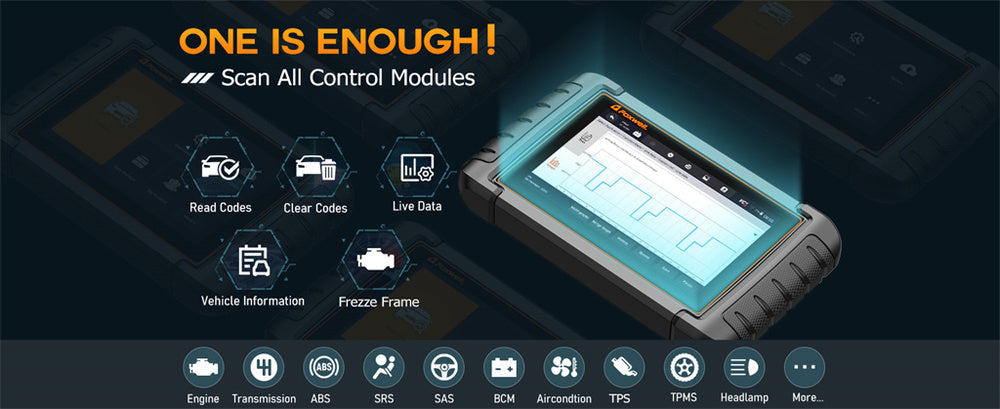
For multi-brand vehicle owners, relying on a dedicated tool like the Foxwell NT710 eliminates the guesswork involved with brand-specific button sequences, providing a universally reliable diagnostic solution.
Tools You Might Need: Using OBD-II Scanners for Push Button Start Cars
If manual methods don’t work, using an OBD-II scanner is a straightforward way to access engine codes. Devices like the Foxwell NT710 make the diagnostic process simple and reliable.
To use an OBD-II scanner, first locate the OBD-II port, usually found under the dashboard near the steering wheel.

Plug the scanner into this port, then turn on the car’s electrical system without starting the engine. Follow the scanner’s prompts to display and read any trouble codes.
Modern OBD-II scanners come equipped with built-in DTC lookup libraries, making it easier to interpret the codes without additional research.
Models like the NT710 even offer real-time data monitoring and system diagnostics, which can provide deeper insights into the vehicle's condition. Wi-Fi connectivity ensures that the device remains up to date, enhancing the diagnostic experience.
Interpreting Codes and Resetting the Check Engine Light
Once you’ve retrieved the codes, interpreting them is essential. Use a trusted online code database or app to find detailed explanations for the DTCs.
Prioritize codes related to critical systems first, such as those involving the powertrain. Keep in mind that DTCs are categorized by the letters they begin with: for example, ‘P’ codes relate to powertrain issues.
After successfully addressing any underlying issues, you must clear the codes to reset the Check Engine Light (CEL). Make sure to reset the codes using your OBD-II scanner or by disconnecting the car battery for a few minutes. This confirms the problem is fully resolved and prevents the dashboard light from returning unnecessarily.
Manual Reset Method (Applicable to Specific Vehicles)
Beyond using an OBD-II scanner or the battery disconnect method, certain vehicles equipped with a push button start system (specifically some Jeep, Chrysler, and Dodge models) may allow you to attempt to reset the check engine light push button start by executing a specific ignition cycle sequence.
This method typically involves quickly cycling the ignition switch (the start button) from OFF → ON → OFF → ON → OFF → ON a specific number of times without pressing the brake pedal. This sequence is often how to check engine code with push button start manually, and in some cases, can clear them too.
⚠️ Important Precaution:
- You must consult your vehicle’s manual before attempting this sequence. Confirm that your model supports this function and understand the correct number of cycles and timing requirements.
- Manually clearing the code does not fix the underlying vehicle problem. If the issue has not been repaired, the Check Engine Light will reappear immediately or soon after. This method should only be viewed as a temporary reset, not a long-term solution.
Precautions to Take When Checking Engine Codes Manually
It’s important to take certain precautions when manually checking engine codes. One crucial aspect is to avoid leaving the ignition on for an extended period without starting the engine, as this can drain the battery.
Additionally, be cautious when handling dashboard controls; pressing or holding buttons incorrectly can reset other settings or trigger unintended functions. Always refer to your vehicle’s manual for model-specific advice before attempting any diagnostic checks.
Make sure you fully understand the codes you retrieve to avoid unnecessary repairs. Misinterpreting codes can lead to addressing the wrong problem and potentially complicating the situation further.

Conclusion
Checking and understanding engine codes in push button start vehicles doesn’t have to be complicated. With the right knowledge and tools, you can confidently diagnose minor issues yourself and take appropriate steps to maintain your vehicle.
This proactive approach not only saves you time and money but also helps you better understand your car's health. Always prioritize safety, double-check your interpretations, and don’t hesitate to seek professional assistance if a code points to a more serious issue.
FAQs
How do I manually check my engine code?
To manually check your engine code, turn the ignition to the "on" position without starting the engine and look for any codes that appear on the dashboard display. Depending on your vehicle, pressing and holding certain buttons, like the odometer reset, might trigger the code display.
How can I get my check engine light code without a scanner?
You can often retrieve the check engine light code without a scanner by turning the ignition on and using a specific button combination on the dashboard, such as pressing the odometer reset button. Refer to your car’s user manual for the exact method for your vehicle.
How do I find out what my engine code is?
To find out your engine code, observe the dashboard display after turning the ignition to the “on” position or use a button combination if your car supports it. If not, an OBD-II scanner is needed for reading the code accurately.
How do I reset the check engine light with push button start?
Some specific vehicle models allow you to enter a diagnostic mode by quickly pressing the start button (without the brake pedal) and then performing a specific sequence to reset the CEL. However, this method is not supported by all vehicles. Always consult your owner’s manual for the specific procedure.
How can I check engine codes on a 2018 Jeep Grand Cherokee with a push button start?
Jeep code reader methods often involve the “key cycle” trick. To attempt this, quickly cycle the start button three to five times (or follow the specific OFF → ON sequence) without pressing the brake. Codes may then appear on your digital odometer. However, we highly recommend using an OBD-II scanner to ensure you retrieve codes from all vehicle systems.
Can I manually read codes on a Honda with a push button start?
The majority of newer Honda/Acura models do not support a simple manual reading sequence. For these vehicles, you must use an OBD-II scanner connected to the diagnostic port to accurately obtain the DTC.


Leave a comment
This site is protected by hCaptcha and the hCaptcha Privacy Policy and Terms of Service apply.