

Choosing a Foxwell diagnostic tool isn’t about chasing the most features. It’s about answering one honest question:
“What kind of repairs do I actually do, day in and day out?”
If you’re stuck between the Foxwell GT60 and the Foxwell NT726, you’re not alone. This is one of the most common and legitimate comparison dilemmas today — not beginner vs professional, not cheap vs expensive, but “more capability” vs “just enough.”
Let’s break it down the way real users experience it.
GT60 or NT726? Why This Is Actually an Easy Choice
Both tools cover full-system diagnostics and bi-directional control supported vehicles and modules. That already puts them far ahead of basic OBD2 scanners.
The real difference isn’t whether they can diagnose. It's how deep you want to go, and how often.
This comparison works so well because:
-
The user personas overlap
-
The feature gap is real but clear
-
The decision is about workflow, not superiority
If you’ve ever thought:
“I want full-system coverage and active tests… but do I really need everything?”
You’re exactly the reader this article is for.
Quick Verdict
-
Choose the Foxwell NT726 if your work revolves around routine maintenance, common service functions, and fast diagnostics.
Choose the Foxwell GT60 if you regularly handle advanced adaptations where supported by the vehicle, deeper system testing, or longer diagnostic sessions.
Now let’s explain why — in real-world terms.
GT60 vs. NT726: Core Differences at a Glance
|
Dimension |
Foxwell GT60 |
Foxwell NT726 |
|
Form Factor |
Android tablet + wireless VCI |
Handheld all-in-one |
|
Bi-Directional Control |
✅ Yes |
✅ Yes (upgraded) |
|
Special Functions |
20+ |
12 core functions |
|
Positioning |
Advanced / semi-professional |
Practical / daily maintenance |
|
Learning Curve |
Moderate |
Low |
|
Software Updates |
1.5 Years Free |
Lifetime Free |
|
Best For |
Deeper diagnostics & adaptations |
Frequent service & quick checks |
|
Price |
$279 |
$299 |
This isn’t better vs worse. It’s broader vs focused.
Living With the Foxwell GT60: When More Really Matters

The Foxwell GT60 scanner shines when diagnostics turn investigative.
If your repairs often involve:
-
ABS bleeding after brake work
-
Injector coding
-
DPF regeneration
-
TPMS relearning
-
System adaptations after part replacement
…
The GT60 starts to feel less like a scanner and more like a tablet-based diagnostic platform.
What Daily Use Feels Like
The tablet form factor changes how you work. You’re not rushing. You’re observing.
You can:
-
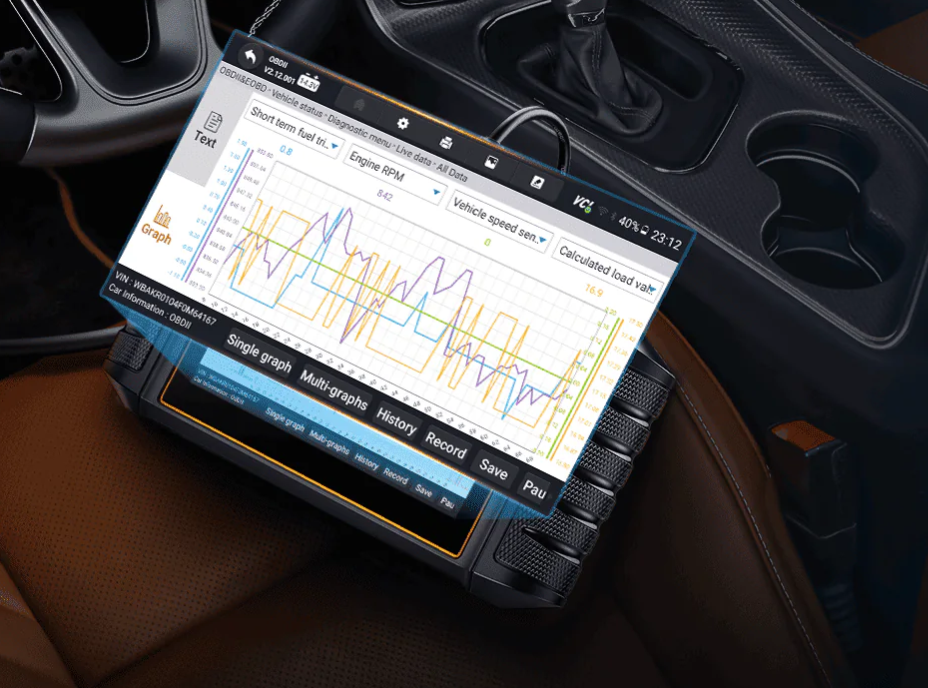
View 4-in-1 live data graphs
-
Record data during a test drive
-
Replay sensor behavior later to confirm your diagnosis
This matters when faults are intermittent, not obvious.
Who the GT60 Is Really For
-
Independent mechanics handling diverse repair scenarios
-
Advanced DIY users comfortable with deeper system logic
Users who perform adaptations and calibrations regularly
Honest Limitation
If you rarely perform advanced functions, the GT60 can feel like more than you need.
It’s powerful but power only helps when you actually use it.
Also reading: Foxwell GT60 Review
Living With the Foxwell NT726: Where “Just Enough” Is Exactly Right

Here’s something many reviews won’t say clearly enough:
The Foxwell NT726 is not “limited.” It’s curated.
Those 12 special functions weren’t randomly selected — they reflect the most common real-world repair tasks.
What Daily Use Feels Like
You plug it in.
You scan.
You fix.
No setup complexity. No workflow friction.
The handheld design makes it perfect for:
-
Quick vehicle intake checks
-
Tight engine bays
-
Frequent stop-and-go diagnostics
It’s the kind of tool you grab instinctively.
What the 12 Special Functions Really Mean
Think:
-
Oil and brake service resets
-
Battery registration
-
Steering angle reset
-
DPF regen (vehicle-dependent)
-
ABS and airbag diagnostics
For most vehicle owners and small workshops, this covers the majority of daily maintenance tasks.
Who the NT726 Is Really For
-
DIY owners stepping beyond basic OBD2
-
Small workshops focused on maintenance and diagnostics
-
Users who value speed and simplicity over depth
Honest Limitation
If your work frequently requires advanced calibrations or system adaptations beyond the 12 functions, you may eventually hit a ceiling.
Also reading: What’s the difference between Foxwell NT706, NT716 and NT726?
Tablet vs Handheld: A Workflow Choice, Not a Status Symbol
-
GT60 (Tablet) = better for long sessions, data analysis, complex diagnostics
-
NT726 (Handheld) = better for fast checks, routine service, daily use
Neither is “more professional.” They simply support different working rhythms.
What Neither Tool Claims to Be (And That’s Important)
Let’s be clear and honest:
-
Neither is a full OEM/dealer ECU programming tool
-
Coding and adaptations are vehicle-dependent
-
Some functions require experience — these are not beginner toys
What they are is practical, capable, and realistic diagnostic tools.
GT60 or NT726? Which One Should You Choose?
Choose Foxwell NT726 if:
-
Your daily work is maintenance-heavy
-
You want fast diagnostics without complexity
-
You value portability and ease of use
Choose Foxwell GT60 if:
-
You often perform adaptations and calibrations
-
You diagnose complex or intermittent issues
-
You want deeper data visibility and tablet workflow
More features only matter when they match your real work.
Final Thought
The GT60 and NT726 aren’t competing for the same user — they’re serving different repair realities.
Choose the one that fits how you actually work, not how you think you should work.
That’s how you end up with a tool you enjoy using — not one that gathers dust.
Frequently Asked Questions
Which tool is better for daily maintenance?
The NT726. Its 12 special functions are carefully selected for the most frequent service tasks.
When is the GT60 worth upgrading over the NT726?
When you regularly need advanced adaptations on supported makes and systems, longer diagnostic sessions, or detailed live data analysis.
Are 12 special functions enough for routine repairs?
Yes — for most users, they cover the majority of real-world maintenance scenarios.
Does the GT60 support advanced adaptations and calibrations?
Yes, but availability depends on vehicle make, model, and system— and it does not replace OEM-level ECU programming tools.
Which tool is better for quick checks vs long diagnostics?
-
Quick checks: NT726
- Long, complex diagnostics: GT60
If the device does not support my vehicle model (e.g., Holden Commodore, Captiva 2.2T diesel), what should I do?
If the official website indicates compatibility but the device fails to function, contact Foxwell's official customer service with detailed vehicle information for feedback.
If incompatibility is confirmed, you may request a return or exchange according to the purchasing platform's after-sales policy (within the return period and with no significant signs of use).
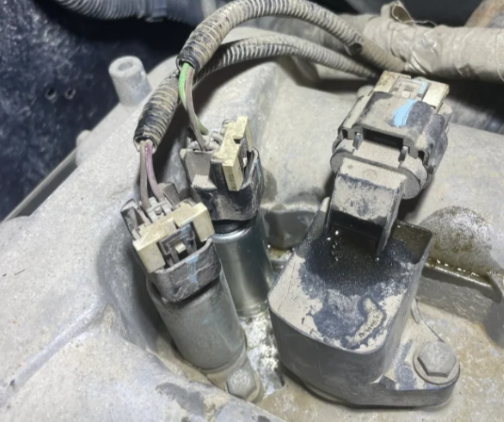
Does the GT60 support crankshaft position sensor (CKP) relearning for GM vehicles?
The GT60 supports CKP relearning for select GM models.
Operation path: Connect device → Select GM brand/model/year → Special Functions → Powertrain → CKP Relearn.
This function is only applicable to GM models whose ECUs support CKP relearn and requires specific vehicle conditions.
Ensure the engine has reached normal operating temperature before proceeding and strictly follow the device prompts.


Leave a comment
This site is protected by hCaptcha and the hCaptcha Privacy Policy and Terms of Service apply.