

Hey there, fellow gearheads and tech enthusiasts! I’m Hezekiah Oluwole, and today I want to share a hands-on story about how a “simple scan” turned into a full diagnostic job—one that really put the Foxwell GT60 to the test.
Key Takeaways
- Core Capability: The Foxwell GT60 stands out from basic OBD2 scanners with full-system diagnostics (covers ABS, EPB, SRS, etc.), bi-directional control, and 24+ service functions (e.g., ABS bleeding, EPB service, DPF regeneration)—critical for complex repairs beyond code clearing.
- Practical Advantages: Responsive 7-inch touchscreen (works with gloves), straightforward setup (Bluetooth/Wi-Fi), broad vehicle coverage (European/Asian/American brands, OBD1/OBD2), and guided workflows for special functions make it user-friendly for both pros and enthusiasts.
- Limitations to Note: No control module coding, key programming, or backward navigation logic; battery life is decent but not for all-day nonstop use without recharging.
- Ideal Users: DIYers seeking more than basic tools, small repair shops, mobile mechanics, and techs who regularly perform EPB/ABS/DPF services—offering mid-range value ($250–$300) without dealer-tool costs.
Curious to see the Foxwell GT60 in action? Watch the hands-on demo—no fancy jargon, just raw results:
When “Just a Scan” Turns Into a Real Diagnostic Job
The job started simple. A 2014 BMW 328i came in with an ABS warning light and an electronic parking brake that wouldn’t release. I had already tried clearing codes with a basic OBD2 reader, but the light came back immediately.
At that point, I knew this wasn’t just about reading codes. I needed a full system diagnostic scanner that could access ABS, run bleeding procedures, and actually talk back to the car.
That’s when I reached for the Foxwell GT60.
I’d been using the GT60 on and off for a while, mostly on everyday diagnostics, but this was a good chance to see how it handled a more involved repair without stepping into high-end, dealer-only territory.
First Impressions and Setup

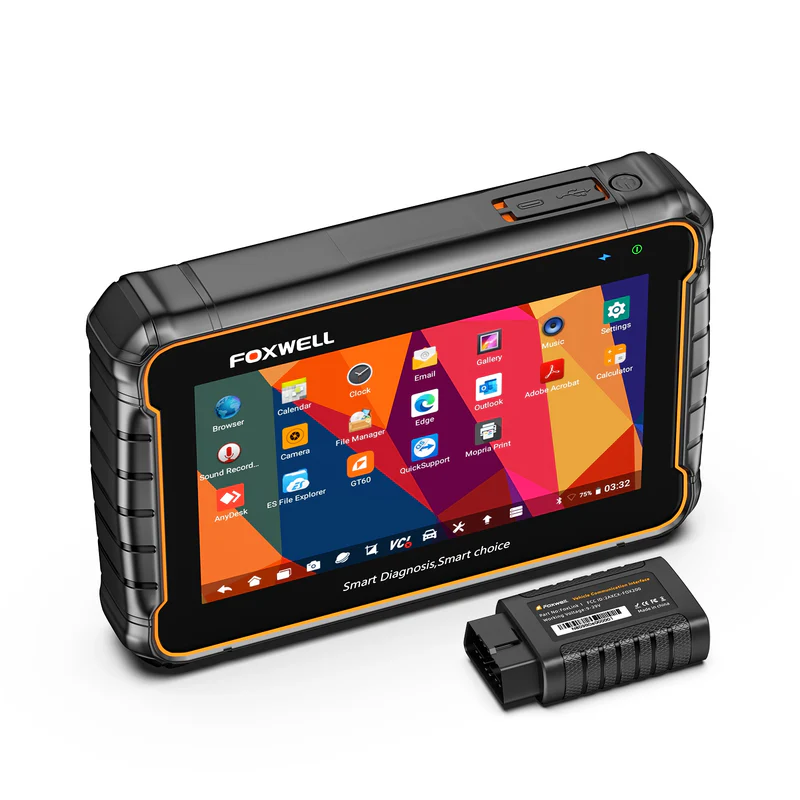
The GT60 is a tablet-style scanner running Android 10.0, powered by the MT8186 2.0 GHz processor. It doesn’t feel flashy, but it feels purpose-built. The 7-inch TFT touchscreen is responsive and, surprisingly, works even with gloves on; something you only appreciate once your hands are already dirty.
Setup was straightforward. I plugged in the diagnostic cable, powered it on, and connected via Bluetooth. The built-in Wi-Fi made checking for updates painless. The 5000mAh battery felt adequate for shop use, though I wouldn’t expect it to last a full day of nonstop scanning without a top-up.
The menu layout wasn’t instantly intuitive, but after a few minutes of poking around, I got the flow.
Full System Diagnostics in Practice
Once connected to the BMW, the GT60 identified the vehicle and gave me access to all major systems; engine, transmission, ABS, SRS, EPB, and body modules. This is where it immediately separated itself from entry-level scanners.
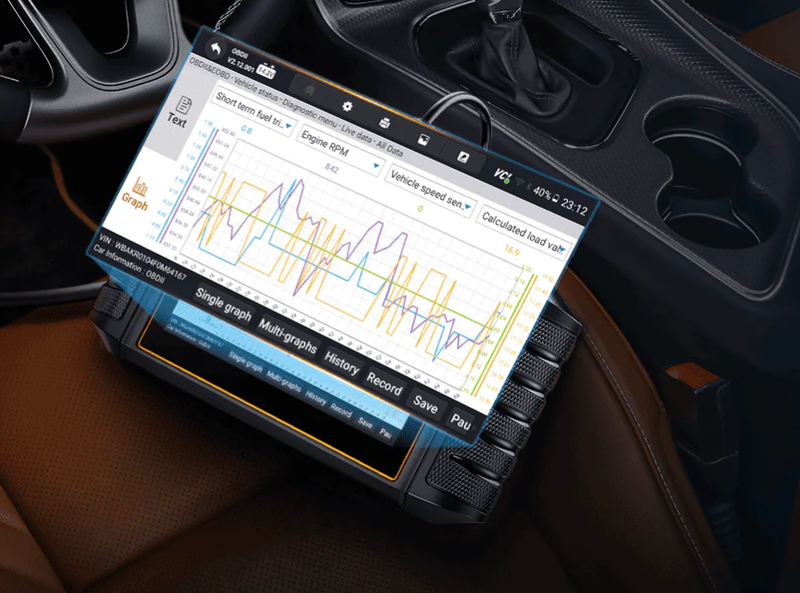
I pulled ABS fault codes, checked freeze-frame data, and jumped into live data to monitor wheel speed sensors. Everything loaded smoothly, and the data refresh rate was fast enough to be useful during real diagnostics.
One thing I liked was that tapping on a fault code didn’t just show a generic description. In many cases, it linked to online explanations and even YouTube-style walkthroughs, which is helpful if you’re training junior techs or double-checking a less familiar system.

ABS Bleeding and Bi-Directional Control
The real test came when I needed to perform ABS bleeding after replacing a brake component. This is where a basic scanner would hit a wall.
Using the GT60’s bi-directional control, I activated the ABS pump and solenoids directly from the scanner. The process was guided step by step, and the car responded immediately. No lag, no communication errors.
I also tested other active functions just to see how far I could push it; cycling the fuel pump, triggering injectors, and even controlling door locks on another vehicle later that day. The GT60 handled active tests confidently, which is exactly what you want from a mid-range diagnostic tool.
It didn’t feel like I was “hoping” the function would work. It either worked, or the scanner clearly told me it wasn’t supported on that vehicle.
Service Functions: Where the GT60 Shines
The GT60 supports 24+ special functions, and in day-to-day work, these are the ones that get used the most. Over the next few days, I used it for:
-
Electronic parking brake (EPB) service on a Volkswagen
-
SAS calibration after an alignment
-
DPF regeneration on a diesel SUV
- Injector coding on a Hyundai
Each function followed a guided workflow. The scanner checked preconditions, prompted me when to proceed, and confirmed when the process was complete. That structure is reassuring, especially if you’re performing these services regularly.
All System Diagnostic · 1.5 Years Free Update · Bluetooth
Vehicle Coverage in the Real World
Foxwell advertises broad coverage, and from my experience, it mostly holds up. I tested the GT60 across several brands:
-
European: BMW, Mercedes-Benz, VW
-
Asian: Toyota, Honda, Hyundai, Kia
- American: Ford and GM
On most vehicles from the 2000s up to around 2019, access was solid. System coverage was consistent, though not every special function worked on every model; something that’s fairly normal at this price point.
It supports both OBD1 and OBD2, which came in handy when diagnosing an older vehicle that newer scanners sometimes struggle with.
Where You Feel the Limitations
It’s important to be clear about what the GT60 does not do.
It does not support control module coding or programming, and it does not handle key programming. If your work revolves around module replacement and advanced coding, this tool will feel limiting.
Navigation was another mixed experience. The GT60 tends to list available functions first and only later asks you to confirm the vehicle. That order can feel backward at times, especially if you’re jumping between cars quickly.
Battery life was decent but not exceptional. On busy days, I kept it plugged in between jobs just to be safe.
Value and Pricing Reality
At its current price, roughly $250–$300, depending on where you buy it, the GT60 sits in a very interesting spot. It’s far more capable than basic scanners, yet nowhere near the cost of professional dealer-level tools.
Who the Foxwell GT60 Fits Best
After spending real time with it, I’d say the GT60 makes the most sense for:
-
DIY enthusiasts who want more than just code clearing
-
Small repair shops handling mixed vehicle brands
-
Mobile mechanics who need portability and versatility
- Technicians who regularly do EPB, ABS, DPF, and service resets
It’s not trying to be everything. It’s trying to be useful, and most of the time, it succeeds.
Wrapping Up
Using the Foxwell tablet scanner GT60 feels like stepping into the middle ground between basic diagnostics and professional car diagnostic tool. It gave me full system access, reliable bi-directional control, and the service functions I actually use; without forcing me into a much higher price bracket.
It won’t replace a dealer scanner, and it doesn’t pretend to. But in daily work, when the goal is to diagnose accurately, perform maintenance functions, and get the car back on the road without guesswork, the GT60 fits comfortably into that role.
For me, it’s become one of those tools that doesn’t demand attention; it just quietly gets the job done.
FAQs:
Does the Foxwell GT60 support vehicles worldwide? Which model years and brands are covered?
- Global Coverage Scope: The Foxwell GT60 is designed primarily for global mainstream OBDII vehicles, covering model years from 1996 onward (1995 in some regions), including passenger cars, SUVs, light-duty trucks, and diesel vehicles.
- Supported Brands: It supports 80+ major vehicle brands, including Asian brands (Honda, Toyota, Hyundai), European brands (BMW, Mercedes-Benz, Volkswagen), and American brands (Ford, GM, Chrysler).
- Compatibility Notes: The device mainly relies on OBDII protocol support. Some brands and earlier vehicles may offer limited OBDI support, but coverage is not universal.
Due to differences in region, model year, and vehicle configuration, certain vehicles or functions may not be supported (for example, some Holden models).
It is strongly recommended to confirm compatibility using the vehicle coverage tool on the Foxwell official website before use.
Can the GT60 diagnose hybrid vehicles and hybrid battery–related issues?
- Basic Hybrid Diagnostic Capability: The GT60 supports system diagnostics for some hybrid vehicles, allowing users to read fault codes and basic data from hybrid-related ECUs.
- Limitations of Hybrid Battery Analysis: However, this capability is limited to basic diagnostics and does not replace factory-level hybrid battery management or in-depth battery health analysis (such as individual cell monitoring or precise State of Health evaluation).
- Compatibility Verification Suggestion: To avoid compatibility issues, users are advised to verify support for specific hybrid models through the Foxwell vehicle coverage database in advance.
How do I check a vehicle’s emissions readiness status (I/M Readiness)?
After connecting the device, navigate to “I/M Readiness” or “Emissions Readiness Test” in the main menu and follow the on-screen instructions to view the emissions system readiness status.
This function applies to most OBDII vehicles from 1996 and newer.
Can the GT60 be used without software updates? What are the benefits of updating?
The Foxwell GT60 includes 1.5 years of free software updates. Even without updating, the device can still perform basic diagnostic functions.
However, skipping updates means missing out on three key benefits:
- The latest bug fixes for improved system stability
- Expanded vehicle coverage for newer models
- Additional functions and updated diagnostic parameters
For the best diagnostic performance and compatibility, regular updates are recommended.
Are software updates free? How do I update the device?
The Foxwell GT60 provides 1.5 years of free software updates.
Update methods include:
- Updating directly via the device’s built-in Wi-Fi
- Connecting the device to a computer and updating through the official Foxwell update tool
Before updating, users must register an account on the Foxwell official website and follow the instructions to download and install the update files.



Leave a comment
This site is protected by hCaptcha and the hCaptcha Privacy Policy and Terms of Service apply.