

Key Takeaways
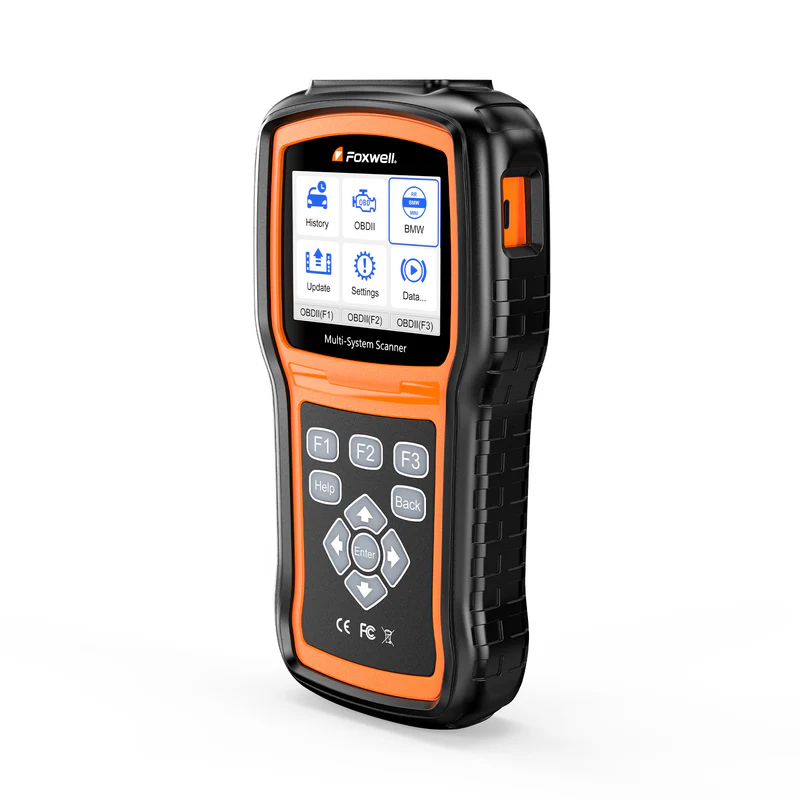
- The NT530 PLUS is a $159 brand-specific full system diagnostic scanner. It ships with one car make software and supports up to five.
- It reads and clears codes across every electronic module in the vehicle, runs bi-directional tests, and handles service resets (oil, EPB, SAS, DPF, TPMS, battery registration).
- It does not support ECU flashing, full module programming or key programming. However, it covers basic module adaptation and light coding for brand-specific vehicles.
- Best suited for DIY owners of European cars and small brand-specialized shops. Not suited for multi-brand general repair or anyone needing advanced ECU work.
- Lifetime free updates with no subscription. At $159, two avoided dealer visits pay for the device.
When a Code Reader Isn't Enough
The job that sold me on the NT530 PLUS started with a 2017 BMW 320i and a brake pad swap.
Pads went in fine. Rotors looked good. But the electronic parking brake wouldn't retract, and the wear sensor needed resetting before the system would cooperate. My basic OBD2 reader couldn't even see the EPB module, let alone talk to it.
I plugged in the NT530 PLUS with BMW software loaded, navigated to the chassis system, and ran the EPB service function. Calipers retracted. Sensor reset. Done in under five minutes. Without it, that's a $120 dealer visit for a procedure that takes less time than making coffee.
That's the scanner's pitch in a single job: OE-level access to every module in a specific car brand, at a price that pays for itself fast.

Full System Access, Not Just Engine Codes
The NT530 PLUS reads and clears fault codes in every accessible electronic module. Engine, transmission, ABS, airbag, body control, climate, instrument cluster. On a modern BMW or VW, that could mean 20+ separate systems.
This is the difference that matters in practice. An ABS warning light won't show up on a generic code reader because the fault lives in the ABS module, not the engine ECU. I had a 2019 VW Tiguan with an illuminated ABS light and zero codes on the owner's basic scanner. The NT530 PLUS pulled the ABS module directly and returned a fault code pointing at the rear-left wheel speed sensor. Checked the connector, found corrosion, cleaned it, cleared the code. Light stayed off.
Without full system access, that diagnosis turns into guesswork or a shop visit.
Bi-Directional Control: Testing Before Replacing
The NT530 PLUS sends commands to the car, not just reads data from it. I've used it to activate ABS pumps, cycle window motors, and trigger fuel injectors on test.
This changes the diagnostic process. Instead of swapping parts and hoping, you command a component to operate and watch what happens. If you tell the ABS motor to run and it doesn't, you've found your problem without pulling anything apart.
On a VAG vehicle, I ran bi-directional tests on the throttle body and fuel injectors during a rough idle diagnosis. The throttle responded correctly; the injectors confirmed uneven spray patterns. That pointed the repair toward injector cleaning rather than a more expensive throttle body replacement.
Service Resets That Skip the Dealer
After spending time with the NT530 PLUS, the service functions became the features I reached for most often. Oil service resets, SAS calibration after alignments, DPF regeneration on diesels, battery registration on BMWs.
Each one follows a guided process. The scanner checks preconditions, prompts you through each step, and confirms completion.
I used it for a forced DPF regeneration on a 2016 Mercedes C220d. The particulate filter warning had appeared, and the owner was quoted over $200 at the dealer for the same procedure. The NT530 PLUS initiated the regen while the engine idled, burned off the accumulated soot, and cleared the warning. Total cost: zero, since the scanner was already paid for.
Live Data and the Intermittent Problem
Where the NT530 PLUS Hits Its Limits
- No ECU coding or programming.
The product page says this directly, and it's accurate. You can't flash modules, code replacement parts to a VIN, or change vehicle configurations. For that, you need something like the Foxwell NT710 or dedicated OEM software.
- No key programming.
If you need immobilizer work, this isn't your tool.
- Slow scan speeds.
A full system scan takes several minutes. Loading live data adds 10–20 seconds per module switch. It's not a dealbreaker, but on busy days, the wait is noticeable.
- Brand software costs extra.
The $223 gets you one make. Additional brands run roughly $80 each, capped at five total. If you work across six or more makes regularly, this model won't cover everything.
- Coverage varies by model.
Bi-directional tests available on a 2018 VW Golf may not exist for a 2015 Hyundai using the same scanner. Always check Foxwell's function list for your specific vehicle before buying.
ALSO READ: Foxwell Scanner NT530 Plus FAQs: Everything You Want To Know
What Users Tend to Notice
Forum feedback follows a pattern. Owners who bought the NT530 PLUS for a specific European brand (BMW, VW/Audi, Mercedes, Porsche) rate it highly. They use it for brake bleeds, battery registration, oil resets, and module-specific codes.
Complaints cluster in two areas:
- scan speed (consistently described as slow)
- uneven feature availability across different car makes.
Build quality gets fair marks. The keypad feels solid, the housing holds up in a shop environment, but it wouldn't survive repeated drops onto concrete. The included nylon pouch earns its keep.
Who Should Buy It (and Who Shouldn't)
- Good fit: DIY owners of a single European brand doing their own brake jobs, oil services, and sensor swaps. Independent mechanics running a BMW-only or VW/Audi shop. Anyone currently paying $80–$150 per dealer visit for service light resets.
- Poor fit: Multi-brand general repair shops processing many different makes daily. Anyone needing ECU coding, module programming, or key work. Users who want a large touchscreen or wireless Bluetooth connectivity.
NT530 PLUS vs NT630 PLUS
The NT530 PLUS and NT630 PLUS are built for entirely different diagnostic goals, making them complementary rather than competing tools.
|
Feature |
NT530 PLUS |
NT630 PLUS |
|
Core Positioning |
Brand-specific full-system scanner for in-depth single-brand repair |
Specialized multi-brand tool focused on ABS / SRS / basic service resets |
|
System Coverage |
Full-system access: Engine, Transmission, ABS, SRS, BCM, Climate and all onboard modules |
Limited core coverage: OBD2 engine, ABS, SRS, and related chassis systems |
|
Bi-Directional Tests |
Full-brand active tests across multiple systems |
Bi-directional control mainly for ABS actuators, pumps and brake bleeding |
|
Key Service Functions |
Oil reset, EPB, SAS, DPF regeneration, battery registration, adaptation |
ABS auto bleed, SRS reset, SAS calibration, EPB & oil service reset |
|
Vehicle Brand Policy |
1 free brand included; max 5 brands total, extra makes purchased separately |
Universal out-of-box multi-brand coverage for mainstream vehicles |
|
Advanced Functions |
Supports module adaptation and light coding; no ECU flashing or key programming |
No coding, adaptation or deep powertrain diagnostic functions |
|
Price & Target User |
$223 starting price; ideal for brand-loyal DIY and single-brand small shops |
Budget-friendly (~$135); perfect for quick brake, airbag and routine service jobs |
The NT630 PLUS covers more brands out of the box but only accesses ABS, SRS, and engine systems. The NT530 PLUS goes deeper into fewer brands. They're not competitors; they solve different problems.
Quick Buying Guide
- Choose NT530 PLUS if you own one main vehicle brand, need full-system deep diagnostics, advanced service functions, and module adaptation capabilities.
- Choose NT630 PLUS if you only need affordable multi-brand coverage, quick ABS/SRS fixes, and routine daily service resets for general maintenance.
FAQ
Does the Foxwell NT530 PLUS support ECU coding or key programming?
No for key programming and full ECU flashing. It supports basic module adaptation and light control coding for daily repair needs.
How many car brands can the NT530 PLUS cover?
Up to five. It ships with one free brand software. Additional makes are purchased separately and loaded through the FoxAssist update tool.
Is the Foxwell NT530 PLUS worth it for a single-car owner?
If you own a European vehicle and do your own maintenance, two or three dealer-avoided service visits cover the $159 purchase price. For brands with less developed Foxwell software, check the function list for your specific model first.
What is the difference between the NT530 PLUS and the NT510 Elite?
Both share similar diagnostic capabilities. The NT530 PLUS has a larger form factor, a physical keypad (vs. silicone buttons), and uses a MicroSD card for updates. Most users find the keypad easier to operate during extended sessions.



Leave a comment
This site is protected by hCaptcha and the hCaptcha Privacy Policy and Terms of Service apply.