


Key Points Summary
- TP on an OBD2 scanner stands for Throttle Position, which reflects how far the throttle is open and directly affects fuel injection, ignition timing, acceleration, and fuel efficiency.
- TP data comes from the Throttle Position Sensor (TPS). Abnormal readings—such as jumps, dead spots, or incorrect values at idle or wide-open throttle—often indicate a faulty TPS, dirty throttle body, wiring issues, or sticking throttle mechanisms.
- Live TP data is more important than fault codes alone. Performing a throttle sweep test and monitoring real-time percentages or voltage is the most reliable way to confirm TPS-related problems before symptoms worsen.
- An advanced scanner like the Foxwell NT1009 enables accurate diagnosis, offering live TP monitoring, TPS-related trouble codes, and relearn functions—helping you distinguish between sensor failure, mechanical issues, and electrical faults.
When diagnosing vehicle issues using an OBD2 scanner, you may encounter a term like TP, which stands for Throttle Position. For many car owners or mechanics, understanding this technical jargon is crucial for interpreting the data from the scanner and identifying potential performance issues.
The Throttle Position Sensor (TPS) is responsible for monitoring how far the throttle is open and sending that information to the vehicle’s Engine Control Unit (ECU).
But what exactly does TP data tell you about your car’s performance, and how can you use it to diagnose problems? In this article, we’ll explore what TP means on an OBD2 scanner, how it works in conjunction with the TPS, and how you can interpret and act on this information using tools like the Foxwell NT1009 scanner.
Whether you’re experiencing throttle lag, poor acceleration, or are simply curious about your car’s throttle system, this guide will provide the insights you need.
What Does TP Mean on an OBD2 Scanner?

When using an OBD2 scanner, TP stands for Throttle Position, which refers to the position of the throttle in your vehicle. This position is critical because it tells the vehicle's engine control unit (ECU) how much air is entering the engine.
The ECU uses this information to adjust fuel injection, ignition timing, and other essential functions to optimize engine performance.
The Throttle Position Sensor (TPS), which is connected to the throttle body, sends real-time data to the ECU about how much the throttle is open or closed.
Understanding the significance of TP data on an OBD2 scanner is crucial for diagnosing potential issues related to throttle response, acceleration, and fuel efficiency.
Also read: How Do I Reset My Throttle Body with Obd2 Scanner?
How Does the Throttle Position Sensor (TPS) Work?
The Throttle Position Sensor (TPS) is a vital component that continuously monitors the throttle valve’s position. This sensor is usually located near the throttle body and sends a signal to the ECU based on how far the throttle is open.
The ECU then adjusts fuel delivery and ignition timing according to the amount of air entering the engine, ensuring optimal combustion and performance.
As you press the accelerator pedal, the throttle valve opens, allowing more air into the engine. The TPS tracks this movement and sends data to the ECU to ensure that the engine receives the proper air-fuel mixture.
A faulty TPS can disrupt this delicate balance, causing issues like poor acceleration, erratic idling, or even stalling.
Where is the TPS sensor located?

On most modern vehicles, you can find the TPS sensor location directly on the throttle body butterfly shaft.
It is typically a small black plastic module with a 3-wire or 4-wire electrical connector. In older cable-driven systems, it is mounted opposite the throttle cable linkage. In newer Electronic Throttle Control (ETC) systems, the sensor is often integrated into the throttle body motor housing itself, making it a non-serviceable part that requires a complete throttle body assembly replacement if it fails.
How Does the OBD2 Scanner Read TP Data?
An OBD2 scanner like the Foxwell NT1009 reads Throttle Position (TP) data by connecting directly to the vehicle's ECU through the OBD2 port. Once connected, the scanner retrieves real-time data from various sensors, including the Throttle Position Sensor (TPS).
The Foxwell NT1009 displays this data in a user-friendly format, usually as a percentage, where 0% means the throttle is fully closed, and 100% indicates the throttle is fully open.
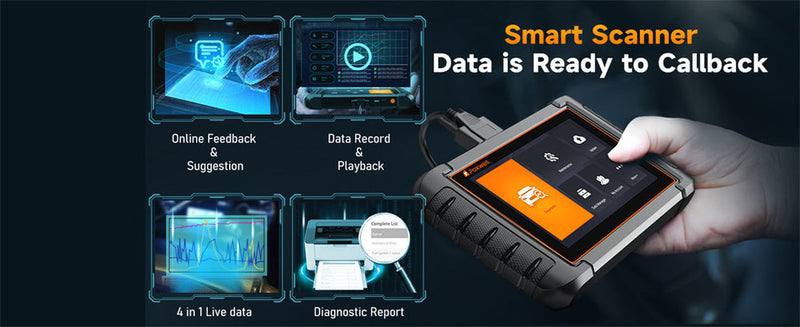
What sets the Foxwell NT1009 apart is its ability to show live data streaming, allowing users to monitor the TP value and other engine parameters in real-time. This makes it easier to diagnose potential issues with the throttle system.
The scanner can also retrieve Diagnostic Trouble Codes (DTCs) related to the TPS, helping users pinpoint any malfunctions that may cause the check engine light to appear.
The Foxwell NT1009’s advanced features, such as real-time monitoring and comprehensive diagnostics, make it a powerful tool for detecting early signs of throttle-related problems.
By observing the TP data, you can spot irregularities in throttle response, assess the sensor's performance, and avoid more severe mechanical issues.

Want to confirm TP / TPS issues instead of guessing?
The Foxwell NT1009 lets you view real-time TP data, perform a smooth throttle sweep test, and read TPS-related trouble codes — so you can tell whether the problem is the sensor, wiring, or throttle body.
Check Foxwell NT1009 →How to Use a TPS Scan Tool for Diagnostics?
- Connect the scan tool to the vehicle’s OBD2 port, then turn the ignition ON with the engine off.
- Enter Live Data and locate the TP / TPS PID.
- Perform a Sweep Test: slowly press and release the throttle pedal while monitoring the TPS percentage.
- A healthy sensor shows a smooth, steady rise and fall. Any sudden jumps, drops, or flat spots confirms a faulty internal circuit.
Understanding TP Live Data and Common DTCs
When monitoring throttle position sensor live data on your Foxwell NT1009, you should look for specific voltage or percentage ranges to ensure the system is healthy.
| Throttle State | Typical TP % | Ref. Voltage | Diagnostic Logic |
|---|---|---|---|
| Idle (Closed) | 3% – 10% | 0.5V – 0.9V | Normal: Modern ETC systems typically do not show 0% and reserve a small idle intake angle. |
| Partial Throttle | 11% – 89% | Increasing linearly | Key check: Values must move smoothly with pedal travel, no jumps or dead spots. |
| WOT (Wide Open) | 90% – 100% | 4.0V – 4.5V | Normal: Throttle fully open; ECU enters full power mode. |
| Faulty (Abnormal) | 0% or fixed value | 0V or fixed | Fault determination: If value does not change with full pedal, usually sensor damage or open circuit. |
If your scanner shows a TP code, it typically falls under these common Diagnostic Trouble Codes (DTCs):
- P0121: TPS Range/Performance Problem (Sensor signal is irrational).
- P0122: TPS Circuit Low Input (Potential short to ground or broken wire).
- P0123: TPS Circuit High Input (Potential short to power).
- P0507: Idle Control System RPM Higher Than Expected (Often linked to a sticking TP sensor).
Pro Tip for Diagnostics
Common Causes of Abnormal TP Readings
Abnormal TP readings can point to various issues in the vehicle’s throttle system, which may affect overall performance. Common causes include:
- Faulty Throttle Position Sensor (TPS): If the TPS is sending incorrect data, the ECU might miscalculate fuel delivery, leading to performance problems.
- Dirty Throttle Body: Carbon buildup on the throttle body can cause it to stick or malfunction, resulting in inaccurate TP readings.
- Wiring Problems: Loose or damaged wiring between the TPS and ECU can disrupt signal transmission, causing erratic TP data.
- Sticking Throttle: Mechanical issues, such as a stuck throttle valve, can result in unusually high or low TP values.
By using the Foxwell NT1009 scanner, you can quickly identify these issues by analyzing the TP data and any related trouble codes.
Diagnosing Vehicle Problems Based on TP Data
Using TP data from your OBD2 scanner, you can diagnose a variety of vehicle problems, particularly those related to acceleration, idle control, and fuel efficiency. Here are some common diagnostic insights based on TP readings:
- Erratic TP Values: If the TP readings fluctuate without any change in throttle input, it could indicate a faulty TPS or a problem with the wiring.
- High TP Values at Idle: If the throttle position is higher than normal when the car is idling, it may suggest a sticking throttle valve or excessive carbon buildup in the throttle body.
- Constant Low TP Values: If the TP remains low, even when the throttle is pressed, it could indicate that the TPS isn’t sending the correct data, requiring a sensor check or replacement.
- No Change in TP Values: If the TP reading doesn't change despite throttle input, the issue could be a severe mechanical problem, such as a disconnected throttle cable or a malfunctioning throttle actuator.
Using a scanner like the Foxwell NT1009, you can track the throttle position in real-time and verify these readings to make informed decisions about whether your car needs repairs or further inspection.
Symptoms of a Faulty Throttle Position Sensor (TPS) and Repair Options

A faulty TPS can cause several performance issues, many of which you can diagnose by monitoring TP data. Common symptoms of a bad TPS include:
- Hesitation or Lagging Acceleration: If the TPS isn’t sending accurate data, the ECU may struggle to provide the right fuel mixture, leading to delayed acceleration.
- Rough Idling: A failing TPS can cause the engine to idle irregularly, with RPMs fluctuating unexpectedly.
- Check Engine Light: If the ECU detects TPS issues, it will store a Diagnostic Trouble Code (DTC) and illuminate the check engine light.
- Poor Fuel Efficiency: When the TPS malfunctions, the engine may run rich or lean, negatively impacting fuel consumption.
To resolve TPS issues, you might need to replace the sensor. However, using an OBD2 scanner like the Foxwell NT1009 will help you diagnose whether the issue is with the TPS itself or if it involves related components like the throttle body or wiring. Additionally, it’s a good idea to clean the throttle body and inspect the sensor’s electrical connections before considering a replacement.
How TP Data Affects Vehicle Performance
The Throttle Position (TP) data has a direct influence on your vehicle’s overall performance. Here’s how:
- Throttle Response and Acceleration: Accurate TP data allows the ECU to deliver the right fuel-air mixture, ensuring smooth and responsive acceleration. A faulty TPS can lead to sluggish or erratic throttle response.
- Fuel Efficiency: Proper throttle position monitoring helps the engine maintain optimal fuel consumption. A malfunctioning TPS can cause the engine to burn excess fuel, leading to poor fuel economy.
- Emission Control: The throttle position plays a role in controlling emissions. When the TP sensor malfunctions, it can cause the engine to run inefficiently, increasing harmful emissions.
- Engine Power: For performance-focused driving, accurate throttle control ensures the engine delivers the right amount of power when needed. A malfunctioning TPS can cause power loss or inconsistent performance.
By using a tool like the Foxwell NT1009, you can monitor the throttle position in real-time and ensure that your engine is running smoothly and efficiently, preventing performance issues before they become serious problems.
Quick Reference: TP Full Form and Variations in Vehicles
For those searching for the tp full form in vehicle contexts, it stands for Throttle Position. In the broader automotive industry, this system is often referred to interchangeably as:
- TPS: Throttle Position Sensor (The physical component).
- TP Sensor: Same as TPS, monitors the butterfly valve angle.
- ETC: Electronic Throttle Control (The modern system that manages the TP data).
While tp meaning car contexts usually point to the engine's intake system, always ensure your scanner is not confusing it with TPMS (Tire Pressure Monitoring System), which is a completely different vehicle safety network. Accurate tp sensor readings are the "eyes" of the ECU, ensuring that every millisecond of acceleration is translated into the perfect air-fuel mixture.
Bonus: What is FLI on an OBD2 Scanner?
While monitoring TP, you might also see FLI on your OBD2 scanner. FLI stands for Fuel Level Input. It indicates the percentage of fuel remaining in your tank. While not directly related to throttle performance, the ECU uses FLI data to monitor fuel system evaporation (EVAP) systems. If you see erratic TP and FLI readings simultaneously, it may point to a broader electrical grounding issue within the vehicle's sensor network.
What Does TPS Mean on Motorcycles?
It is worth noting that the TPS meaning in motorcycle contexts is identical to automotive systems. Just like in a car, a bike's TPS monitors the butterfly valve position to manage fuel mapping. However, motorcycles are more sensitive to TPS calibration due to their high-revving nature. A faulty motorcycle TPS often manifests as "stumbling" at low speeds or a sudden surge in power during mid-range acceleration.
Conclusion
Understanding what TP means on an OBD2 scanner is essential for diagnosing and maintaining your vehicle’s performance. The Throttle Position Sensor (TPS) plays a critical role in regulating your engine’s air-fuel mixture and ensuring smooth acceleration, fuel efficiency, and proper emissions control.
With an OBD2 scanner like the Foxwell NT1009, you can easily monitor TP data and catch potential issues early. This tool provides real-time diagnostics, helping you identify problems with the throttle system, such as a faulty TPS, dirty throttle body, or wiring issues.
By using this information, you can make informed decisions about repairs and keep your vehicle running efficiently.
FAQs
How to Reset the TP Sensor and What Happens if You Don't?
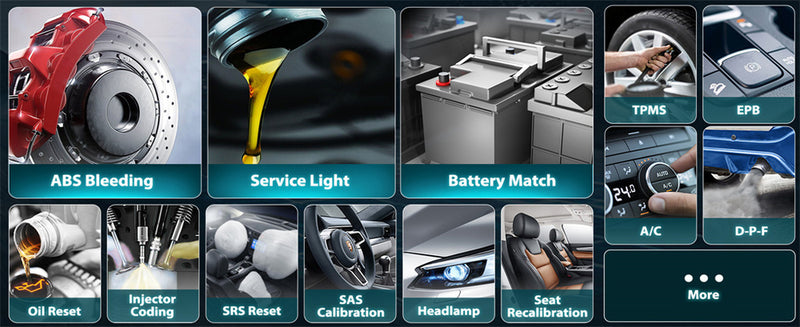
Many drivers wonder how to reset the TP sensor after a repair. For most modern vehicles, this involves a "Throttle Relearn" procedure. You can often perform this using the Foxwell NT1009 by navigating to the "Special Functions" menu and selecting "Throttle Relearn" or "Idle Learn Reset." This tells the ECU the new zero-position of the throttle plate.
What happens when a TPS sensor goes bad and is left ignored? Beyond poor drivability, a failing sensor can cause your car to enter "Limp Mode," limiting your speed to protect the engine. Over time, the incorrect air-fuel mixture will also lead to premature catalytic converter failure, turning a simple sensor swap into an expensive exhaust repair.

Leave a comment
This site is protected by hCaptcha and the hCaptcha Privacy Policy and Terms of Service apply.