

The On-Board Diagnostics II port is a familiar sight for those familiar with car diagnostics. It's a small rectangular plug used by mechanics to assess your engine and other systems - but more recently, there have been discussions surrounding whether this plug can also be used beyond diagnostic purposes, specifically, whether unlocking doors and even starting engines via this port could be possible using only OBD2 Scanner cables. Let's delve in.
Understanding the OBD-II Port

Since the mid-1990s, your OBD-II port has been the entryway into your vehicle's brain; every car has one. Its primary use is so mechanics can connect a scanner to read trouble codes and monitor various systems within it—think of it as having your health monitor for your car!
The OBD-II port serves several essential functions. First and foremost, it reads diagnostic trouble codes (DTCs), which provide insight into what may be going wrong when the "check engine" light illuminates. Furthermore, it monitors real-time data from sensors like engine temperature and speed monitoring, providing essential insights for maintaining optimal vehicle health and performance.
Where Is the OBD Port in a Car?
While most drivers know the OBD port is used for vehicle diagnostics, fewer people know exactly where the port is located or how it connects to different electronic systems inside the car.
The OBD-II connector is a standardized 16-pin interface (the core hardware standard of OBD-II) that provides access to a vehicle's internal communication network. Because the port connects to multiple control modules, it acts as the primary gateway between diagnostic tools and the vehicle's electronic systems.
The OBD2 port location in a car is standardized by regulations, although the exact position may vary slightly depending on the vehicle manufacturer.
In most vehicles, the port is located under the driver's side dashboard (within 2 feet/60 cm of the steering wheel), a requirement mandated by U.S. vehicle regulations to facilitate quick connection of emissions testing equipment by technicians.
Common locations include:
- Near the center console (beside the gearshift / below the center panel)
- Below the driver's dashboard (near the steering column)
- Below the driver's dashboard (behind the small plastic cover marked with "OBD" or "Diagnosis")
If the port is not immediately visible, checking the driver's footwell area usually reveals its location.

What Does the OBD Port Connect To?
The OBD port connects to multiple electronic control modules inside the vehicle. These modules communicate through the vehicle's internal network.
Common systems accessible through the OBD port include:
- Engine Control Module (ECM) – controls fuel injection, ignition timing, and emissions
- Transmission Control Module (TCM) – manages gear shifting and transmission performance
- ABS Control Module – monitors braking system sensors
- Airbag Control Module (SRS) – monitors crash detection systems
A diagnostic scanner can read information from these systems in real time. For example, a scan tool may display:
- engine RPM
- coolant temperature
- oxygen sensor data
- fuel trim adjustments
This information helps technicians quickly identify problems without dismantling the vehicle.
However, despite this level of access, the OBD port is primarily designed for diagnostics rather than direct vehicle control, which is why starting a car through the OBD port is extremely difficult in modern vehicles.
How to Quickly Check If Your OBD Port Is Working Properly (DIY Guide for Car Owners)
- Check the 16-pin connector for bent, damaged or rusted pins (the most common cause of connection failure);
- Try connecting your scanner to another car’s OBD port to rule out scanner malfunctions;
- Inspect the OBD cable for breaks or loose connections.
The Evolution from OBD1 to OBD2
Key improvements of OBD2 over OBD1 include:
- Standardized OBD-II core hardware and code system (16-pin diagnostic connector, universal DTCs)
- Universal diagnostic trouble codes (DTCs)
- Real-time sensor data monitoring
- Improved emissions monitoring systems
Because of these improvements, OBD2 made vehicle diagnostics much easier for mechanics, technicians, and even regular drivers using consumer scan tools.
OBD2 Adoption Timelines Across Different Regions
- EU petrol vehicles: All models manufactured from 2000 onwards;
- EU diesel vehicles: All models manufactured from 2004 onwards.
OBD2 Communication Protocols
Common OBD2 Communication Protocols
- ISO 9141-2: Mainly applied to older European and Asian vehicle models
- Keyword Protocol 2000 (KWP2000): Used in numerous vehicles from the early 2000s
- SAE J1850 PWM / VPW: Primarily for older Ford and GM vehicles
- CAN Bus (Controller Area Network): The modern industry standard, adopted by most vehicles after 2008
Key Protocol Characteristics
- CAN Bus is now the most widely used OBD2 communication protocol worldwide.
- National regulations in many countries mandate CAN Bus support for all vehicles manufactured post-2008 for diagnostic purposes.
- A vehicle’s adopted protocol determines two critical points:
- Which pins in the 16-pin OBD2 connector are activated for data transmission
- The communication mode between scan tools and the vehicle’s onboard computer systems
Are OBD2 Scanners Compatible With All Cars
Most OBD2 scanners are compatible with vehicles manufactured after 1996 in the United States. However, the level of compatibility can vary depending on the scanner and the vehicle manufacturer.
Basic OBD2 scanners only support the core diagnostic functions of OBD-II (reading engine and emissions-related standardized diagnostic trouble codes), a regulatory-mandated function compatible with nearly all OBD2 vehicles.
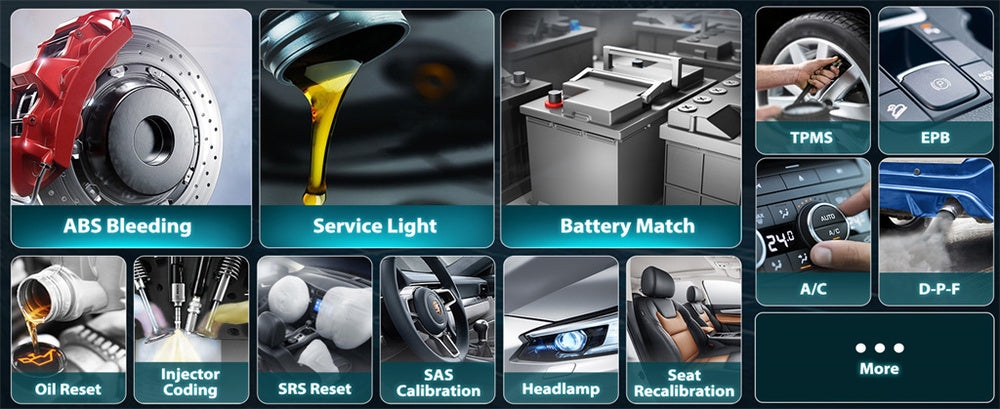
More advanced diagnostic tools can access additional vehicle systems such as:
- transmission control modules
- ABS systems
- airbag systems
- manufacturer-specific fault codes
Access to these advanced functions often depends on the scanner’s software and licensing agreements with vehicle manufacturers.
Because of this, entry-level code readers typically provide basic engine diagnostics, while professional scan tools offer deeper access to vehicle systems and advanced diagnostic capabilities.
Can OBD-II Unlock Car Doors?
Your OBD-II port connects directly with your car's central locking system. Using the OBD-II port to unlock car doors may be possible with proper commands. Some speculate that sending signals through this port could unlock them, but that is unlikely, as OBD cannot send out pop signals that open locks directly. Unfortunately, it doesn't work this way!
Car manufacturers recognize this potential vulnerability and have taken several precautions to safeguard against unauthorized access. Each car manufacturer utilizes its security protocols; what works for Ford may not work for Toyota. Modern cars use encrypted communication between the OBD-II port and the car's systems, making it harder for outside devices to send commands via the OBD-II port.
Encryption and authentication measures are designed to keep unauthorized persons from plugging into or unlocking your car.
Can OBD-II Start My Engine?
Your car's Engine Control Unit, or ECU, serves as its nerve center - overseeing everything from starting up to fuel injection. In theory, communicating with it through the OBD-II port could allow for communication and restarting your engine; however, starting it will take more work.
Most cars rely on encrypted signals sent from a key fob to start their engines, so without receiving an appropriate signal, the vehicle cannot start. Immobilizer systems add another layer of protection; even if an attacker gains entry via the OBD-II port, an immobilizer will prevent the engine from starting without proper keys being present.
Each car brand employs security protocols that are regularly updated to prevent hackers. These protocols ensure that only authorized individuals can start the engine regardless of physical access to OBD-II ports.
Security Implications and Real-World Scenarios
Unfortunately, cases have been documented of hackers exploiting car systems. These hackers tend to be highly skilled individuals with extensive knowledge about specific car systems. Incidents involving this sort of hack usually require sophisticated techniques and expertise from those involved.
Automotive industries are aware of these threats and strive to increase security measures. Car makers collaborate with cybersecurity experts to identify and fix vulnerabilities quickly. Manufacturers frequently update their security protocols in response to emerging threats to ensure maximum protection of vehicles on the road.
How to Protect Your Car from OBD Port Attacks
Although the OBD port is mainly designed for diagnostics, it can potentially be misused if someone gains physical access to the vehicle. For this reason, some drivers choose to add extra security measures to protect the diagnostic port.
Below are several practical ways to reduce the risk of OBD-related vehicle theft.
- Use an OBD Port Lock
An OBD port lock is a small physical device that blocks unauthorized access to the diagnostic connector.
These locks typically:
-
- cover the 16-pin OBD port
- require a key to remove
- prevent tools from being plugged into the port
Because many key-reprogramming attacks require access to the OBD port, installing a lock can significantly reduce the risk of this type of theft.
OBD locks are relatively inexpensive and can usually be installed in less than five minutes.
- Park in Secure Areas
- Disable Keyless Entry When Possible
store key fobs in RF-shielding pouches
keep spare keys away from entry doors or windows
Daily Usage Notes for OBD Tools
- You can drive with an OBD tool plugged in (it allows real-time monitoring of vehicle data, and even clearing DTCs while driving);
- Use wireless/Bluetooth OBD tools to avoid messy cables in the driver’s footwell (wired cables pose a safety hazard while driving);
- If monitoring data while driving, ask a passenger to operate the device—never use a mobile phone or scanner while driving yourself.
Utilizing Scanners Properly
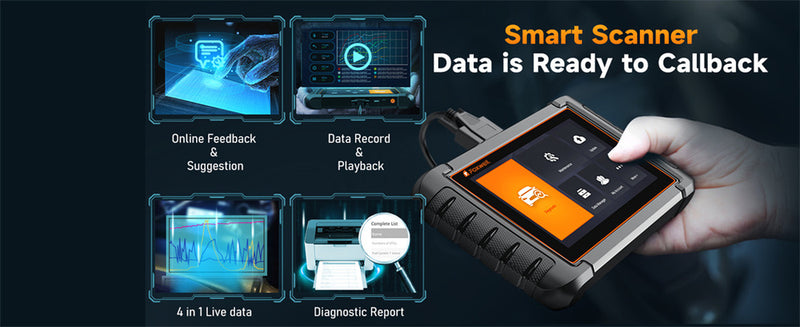
A diagnostic scanner such as the Foxwell NT809BT is critical for effectively checking and maintaining your vehicle's health. This advanced tool can read and clear diagnostic trouble codes, view live vehicle data, perform various system tests, as well as connect to an OBD-II port to gain insight into engine performance, transmission issues, ABS systems, and airbag systems to detect issues before they become significant issues for optimal condition in your car.
Its wireless connection enables more convenient vehicle diagnostics and maintenance, greatly improving the efficiency of daily vehicle upkeep.

OBD2 Scanner Buying Guide (By Budget & Need)
| Scanner Grade | Budget | Ideal for | Core Functions |
|---|---|---|---|
| Basic | ≈$20-$30 | Beginner drivers |
|
| Advanced | ≈$50-$100 | Savvy drivers, car enthusiasts |
|
| Professional | ≈$200+ | Garages, professional mechanics |
|
Conclusion
Can the OBD-II port help unlock car doors and start its engine? In theory, possibly. But in practice, it isn't feasible.. Car manufacturers invest significant resources into ensuring their vehicles are secure with encryption, authentication, and other methods of protecting them as cars become smarter; OBD-II ports remain powerful diagnostic tools but aren't meant as backdoors into the most critical functions of your car's functionality.
FAQs
What is the primary function of the OBD-II port?
The OBD-II port is primarily used for vehicle diagnostics, allowing mechanics to read trouble codes and monitor various car systems.
How do modern cars secure the OBD-II port?
Modern cars use encryption and authentication protocols to secure the OBD-II port, ensuring only authorized access to vehicle systems.
Why do car manufacturers constantly update security protocols?
Car manufacturers continuously update security protocols to address new threats and vulnerabilities, ensuring the safety and security of their vehicles.
Can thieves start a car through the OBD port?
Is there a device that can start a car through the OBD port?
There is no legitimate OBD starter device that can simply start a car by plugging into the diagnostic port. The OBD port is designed for diagnostics, not ignition control. Modern vehicles require encrypted communication with the immobilizer system before the engine can start.
How can I lock my OBD port for security?
You can secure the diagnostic port by installing an OBD port lock. This small device covers the port and prevents unauthorized tools from being connected. Some drivers also combine this with secure parking and key-fob protection to reduce the risk of vehicle theft.
Can you drive with an OBD tool plugged in?
Can OBD fault codes pinpoint the exact vehicle problem?

Leave a comment
This site is protected by hCaptcha and the hCaptcha Privacy Policy and Terms of Service apply.