

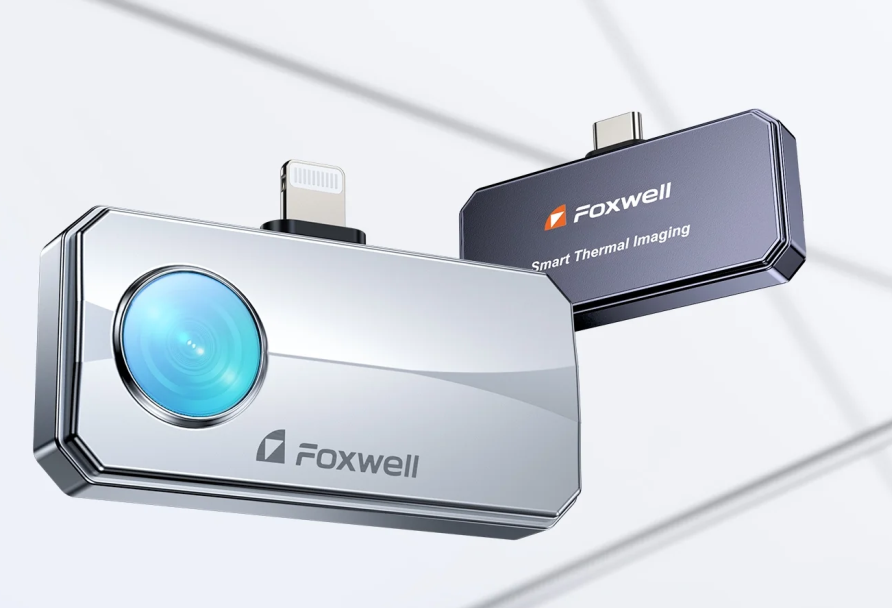
This RT100 FAQs is designed to answer those exact questions—based on real user concerns—so you can decide with confidence.
Device Compatibility & Connection
Does Foxwell RT100 work with iPhone (iOS)?
Yes. The thermal camera RT100 offers full compatibility with both iPhone (iOS) and Android smartphones. Key Details for iPhone Users:
- Plug-and-Play: Specifically designed versions are available for iPhones with Lightning or USB-C ports (depending on your iPhone model).
- Dedicated App: Simply download the Foxwell RT100 Thermal app from the Apple App Store to start high-resolution (512x384 TISR) thermal imaging.
- No Adapter Needed: Ensure you select the "iPhone" style when adding to your cart to get the native connector for your device.
Does Foxwell RT100 work with Android phones?
Yes — this is the primary platform.
Requirements:
- USB-C port
- OTG support
- App installed
Does Foxwell RT100 work with Windows PC?
Yes.
- Supports PC via FoxIR software for thermal image viewing, analysis and report generation.
- Can also function as USB camera
Must I remove my phone case to use RT100?
In most cases, yes, due to connector depth. Using the included USB-C extension cable can help avoid this issue.
Does RT100 support USB adapters or extension cables?
Yes. It includes:
- USB-C cable (approx. 25.5 inches)
Useful for:
- Hard-to-reach areas
- Avoiding phone case issues
Real-World Applications
Can I use RT100 to find heat loss in my home?
Yes — this is one of the most common uses.
You can easily detect:
- Insulation gaps
- Air leaks around doors/windows
- Heat escaping walls/ceilings
👉 Best used:
- In winter or temperature contrast conditions
Can RT100 help diagnose electrical problems (wiring, connections)?
Yes — very effective.
It can quickly identify:
- Overheating wires
- Loose connections
- High resistance points
👉 Typical use:
- Electrical panels
- Boat wiring
- DIY systems
Can RT100 detect battery or power system issues?
Yes.
It works well for:
- Battery packs
- Solar systems
- Power distribution setups
It helps identify:
- Uneven heating
- Overloaded components
- Poor connections
Can RT100 be used for HVAC and mechanical inspection?
Yes. Common uses include A/C diagnostics and mechanical overheating detection.
Can RT100 be used outdoors to detect animals or pets?
Partially. It can:
- Detect heat sources in low-light or dark environments
But limitations:
Performance depends on:
- Distance
- Obstructions (e.g. thick foliage)
Not designed as a dedicated wildlife tracker.
Core Diagnostic Performance
How accurate is the Foxwell RT100’s temperature measurement really?
There are two different concepts here:
- Sensitivity (0.1°C) : The RT100 is incredibly sensitive. It can detect temperature fluctuations as small as 0.1°C. This means even if a wall leak or a PCB component is only slightly warmer than its surroundings, the 512x384 TISR resolution will make that thermal difference "pop" visually.
- Accuracy (±2°C or ±2%) : In terms of absolute numbers, the RT100 maintains a professional-grade tolerance of ±2°C (or ±3.6°F). This precision remains consistent across its massive -4°F to 1022°F measuring range.
In Practice with the RT100:
- Very good for finding hotspots / abnormal heat
- Not intended for lab-grade precise measurement
Can RT100 automatically detect the hottest area?
Yes. The RT100 supports:
- Point / Line / Area measurement
- Automatic high & low temperature tracking
- Real-time temperature display
This is useful for:
- Electrical diagnostics
- Leak detection
- Thermal anomaly scanning
Is 256×192 resolution enough for detailed inspections?
It depends on how detailed your inspections need to be.
- 256×192 resolution:
Suitable for basic checks, such as:
Finding obvious heat loss in homes
Detecting large overheating components
Spotting general temperature anomalies
👉If your goal is simply to confirm a problem, 256×192 is often enough.
- 512×384 resolution (RT100):
Designed for more detailed and professional inspections, including:
Automotive wiring and electrical diagnostics
PCB and electronics troubleshooting
Identifying small or subtle hotspots
👉 If you need to pinpoint the exact source of an issue, higher resolution like 512×384 makes a significant difference.
Does the Foxwell RT100 support changing color palettes?
Yes. RT100 includes:
- 10 color palettes
- Multiple image modes (thermal / fusion / PIP)
👉 Why it matters:
- Different palettes help highlight different problems
- Heat loss → high contrast
- Electrical → hotspot emphasis
Can I use RT100 for PCB or electronics repair?
Yes — but with some limitations.
The RT100 works well for:
- Locating overheating components on circuit boards
- Identifying abnormal heat patterns in electronic devices
- Diagnosing power issues or short circuits
With its 512×384 TISR enhanced resolution, it can clearly show temperature differences and hotspots, which is key for electronics troubleshooting.
However:
- It is not designed for ultra-fine component inspection (e.g. tiny chips like 0402)
- It does not include a built-in macro lens
👉 Recommended setup for better results:
- Use an external macro lens for close-up inspection
- Focus on heat-based diagnostics, not visual detail
👉 Bottom line:
Great for quickly finding problem areas on electronics — but for micro-level precision work, additional tools may be needed.
Hardware & Battery Performance
How is the Foxwell RT100 battery life? Does it need charging?
The RT100 uses a battery-free design powered directly by your phone, with ultra-low power consumption (0.24W). It can run up to 10 hours continuously and avoids battery aging or charging issues.
Can RT100 work as a USB camera (UVC)?
Yes — in many cases.
When connected to a PC:
- It can be recognized as a standard USB camera
- Works with basic camera software
👉 However: Advanced thermal features require dedicated software (FoxIR)
Is the RT100 portable and durable?
Yes. It features a metal body for fast cooling/durability and comes with a hardshell protective case.
Addressing Common Hesitations
Why does RT100 make a clicking sound every few seconds?
That’s normal. It's the automatic thermal calibration (shutter) ensuring measurement accuracy. It cannot be disabled and doesn't affect performance.
Is RT100 easy to use for beginners?
Yes — the RT100 is designed to be very beginner-friendly.
You can start using it within minutes:
- Plug-and-play design: simply connect it to your phone (Android or iPhone)
- No charging required: powered directly by your smartphone
- Simple mobile app: real-time thermal view with intuitive controls
Even without technical experience, you can:
- Instantly see hot and cold areas
- Identify issues like heat loss, electrical hotspots, or airflow problems
👉 Why it matters:
Instead of manually checking components one by one, the RT100 lets you visualize problems instantly, making it much easier for beginners to understand what’s happening.
Note: First-time setup may require enabling permissions (like OTG on Android), but overall learning curve is minimal.
Software, Storage & Support
Where do I download the app for the Foxwell RT100?
- Search "Foxwell RT100 Thermal" in the App Store/Google Play,
- Use FoxIR software on PC.
How does the Foxwell RT100 handle storage for videos and images?
RT100 is an external thermal imaging device for mobile phones.
The files are directly saved to the local storage of the phone.
The device itself has no built-in storage and does not require a memory card. The storage space can be flexibly utilized according to the capacity of the phone and can meet the needs of frequent inspections.
Does the RT100 support recording and report generation?
Yes. It supports image capture, video recording, and generating simple PDF reports with thermal data.
Can the Foxwell RT100 change the image save location on PC?
It depends on the software.
- On mobile → usually managed inside the app
On PC (FoxIR or other software):
- Some settings are adjustable
- Some versions may use default folders
This is a known limitation — not all workflows are fully customizable.
Does RT100 come with a macro lens?
No — the RT100 does not include a macro lens in the standard package.
What this means:
- Out of the box → good for general inspection
- For micro-level work → you may need an additional lens
Does the RT100 support macro or close-up inspection?
Not natively.
The camera itself does not include a built-in macro mode, but:
- It can work with external macro lenses
- Users often DIY or buy third-party lenses for close inspection
👉 This is especially useful for:
- PCB troubleshooting
- Small electronic components


Leave a comment
This site is protected by hCaptcha and the hCaptcha Privacy Policy and Terms of Service apply.