

Have You Found That the check engine light is flashing, Signaling Something is Wrong with My Car?
Unfortunately, that check engine light could be signaling something amiss, while using an auto car scanner is the most accurate way to diagnose issues, but don't panic: easy methods allow us to decipher Ford codes without using car scanners! Let's dive in now for some actionable steps on decoding those Ford codes yourself without using fancy equipment!
Understanding Your Ford's OBD Systems

First, look under the hood where On-Board Diagnostics (OBD) systems keep tabs on everything: engine performance, transmission issues, and so forth.
OBD1 was used by Ford cars from the early '80s until the mid-1990s as an analog method for car diagnostics, while OBD2 became standard starting in 1996 as its replacement, providing much simpler and uniform diagnostic solutions.
Digging up OBD1 codes in retro style can sometimes prove challenging. To simplify things further, here is how you can locate OBD1 codes quickly: by searching online.
How to Know If Your Ford Uses OBD1 or OBD2 (Critical Before Trying)
| Comparison Item | Ford OBD1 Vehicles | Ford OBD2 Vehicles |
|---|---|---|
| Production Year | Pre-1996 | 1996 and Newer |
| Alternative Name | EEC-IV system | Standardized OBD2 |
| Common Models | • Ford F-150 (1980s–1995) • Ford Ranger (pre-1995) • Early Ford Explorer • Ford Mustang (Foxbody era) |
• F-150 (1996+) • Ford Focus • Escape • Expedition • Explorer (1996+) |
| Diagnostic Port | No modern OBD2 port | 16-pin OBD2 port |
| Code Reading Method |
Use Self-Test connectors under the hood + read flashing Check Engine Light signals Jumper Wire Method: Short the Self-Test Input to read flashing light pulses. |
1. Through 16-pin OBD2 port Digital Display: Use odometer button combinations or an OBD2 scanner. |
| Key Note | Incompatible with OBD2 methods | Standardized procedure; manual options available for some models |
Do you have a Ford from an earlier era with OBD1?
Here's how you can quickly access its codes without breaking a sweat.
Method 1: The Check Engine Light Dance
When your check engine light illuminates, consider it sending you Morse code - here's how you can decipher it:
- Prepare: Park your car, turn off its engine, and check that all devices are off - like setting the stage for a magic trick.
- Find Your Spot: To locate the diagnostic connector hidden under the driver-side Dashboard like an Easter egg.
- Turn Your Key: Put the key into the ignition and turn it to "Run" without starting your engine.
- Watch The Light Show: Your check engine light should start flashing a sequence; for instance, two flashes followed by one flash, and then three flashes mean code 23.
- Decode the Message: Consult your vehicle manual or Google to determine what each flash means; this is like decoding a secret code!
Common Ford OBD1 Flash Codes to Watch For:
- Code 11: System Pass (Everything is fine).
- Code 13: DC motor did not move (Check throttle body).
- Code 33: EGR valve not opening (Check vacuum hoses).
- Code 41: System lean (Fuel or oxygen sensor issue).
How Ford Flash Codes Work
On older Ford vehicles with the EEC-IV OBD1 system, diagnostic trouble codes can be displayed as a series of flashes from the Check Engine Light. The flashes represent numbers that can be combined to identify the stored fault code.
To read Ford flash codes, turn the ignition to the KOEO (Key On, Engine Off) position and start the self-test. The Check Engine Light will flash a sequence of times, pause, and then flash again. Count each sequence carefully and record the numbers in the order they appear.
For example, if the light flashes twice, pauses, and then flashes three times, the sequence represents a two-digit code such as 23. The exact code format and test procedure can vary by Ford model and engine, so always verify the code against the appropriate Ford diagnostic code reference.
Tip: If the flashes are difficult to count, a Ford OBD1 code reader can retrieve the codes more easily than manually counting the Check Engine Light.
Method 2: Paperclip Hack
If flash methods don't do the trick, grab a paperclip - this method acts like MacGyver in your car!
- Safety First: Switch off the engine and take out your key before doing anything else!
- Locate the Connector: Head back under the dash to search for that connector.
- MacGyver It: Fold that paperclip into a U-shape and insert it into the "Self-Test Input" and "Signal Return" terminals of both connectors—that should do it!
- Turn the Key: Place the ignition key into the "Run" position without starting your engine.
- Decode the Disco: Focus on watching the light and decoding as before - like reading stars, but for car problems!
How to Read Ford Codes Without a Scanner?
A Ford OBD1 code reader provides an easier way to retrieve diagnostic trouble codes than manually counting check engine light flashes. On older Ford vehicles equipped with the EEC-IV diagnostic system, the reader connects to the vehicle's self-test connector and displays the stored fault codes.
1. Locate the Ford OBD1 Diagnostic Connector
Find the EEC-IV self-test connectors, usually located in the engine compartment near the firewall or fender area. Ford OBD1 systems commonly use a larger self-test connector along with a smaller Self-Test Input (STI) connector.
2. Connect the OBD1 Code Reader
Connect the Ford OBD1 code reader to the appropriate self-test connector. Make sure the connection is secure before starting the test.
3. Turn the Ignition to KOEO
Turn the ignition key to the KOEO (Key On, Engine Off) position without starting the engine. Follow the instructions for your specific code reader to begin the self-test.
4. Read and Record the Codes
The code reader will retrieve the diagnostic codes generated by the vehicle. Record every code in the order it appears. Do not replace a component based on a code alone because a DTC identifies a detected problem, not necessarily the failed part.
5. Run a KOER Test if Supported
Some Ford OBD1 code readers can also perform a KOER (Key On, Engine Running) test. If supported by your vehicle and reader, start the engine when prompted and follow the test instructions.
6. Look Up the Ford DTC Meaning
Once you have the codes, compare them with a Ford diagnostic code reference to identify the affected system and common causes. For example, an OBD1 code related to the EGR, oxygen sensor, or fuel system requires different diagnostic steps.
Ford OBD1 Code Reader vs. Jumper Wire
A code reader is easier to use because it retrieves and displays the diagnostic information for you. A jumper wire or paperclip method can also trigger the Ford self-test, but you must interpret the resulting flash codes manually.
If you frequently diagnose older Ford vehicles, an OBD1-compatible code reader can save time and make code retrieval more straightforward.
Crack OBD2 Codes: Welcome to the Future
Have a newer vehicle with OBD2 technology?
Here's how you can communicate with it.
Method 1: The Odometer Carrot Trick
This technique seems too simple; it feels like magic.
- Press and Hold: Press the Trip and Reset buttons of the odometer simultaneously for 30 seconds without pressing the key into position (without starting the engine) before turning the Key "On."
- Magic Numbers: Release the buttons when trouble codes appear on the odometer's display, note them down, and research further as necessary.
- Imagine this: while pressing those buttons and turning on your car key, the odometer suddenly starts flashing codes at you—like someone has compromised it! Someone has gained entry to their vehicle!
Method 2: Jumper Wire Jedi
Fancy yourself as a secret agent? Try this:
- Search the Dashboard Near the Steering Column: It is like finding an entrance to an underground base!
- Wire up: A jump wire connects both pins in the OBD2 Port (OBD2). Turn Key Action "On."
- Counter the Blinks: Watch your check engine light flash out codes, write them down, and decode them online or via your manual.
Imagine this: you're under your Dashboard connecting those pins with wire. As soon as you turn on the key, suddenly, your check engine light begins flashing codes like it's trying to communicate something to you. It's equal parts spy movie and car mechanic—and absolutely fascinating.
What Do Ford Diagnostic Codes Look Like?
Ford trouble codes follow a structured format:
Example: P0301
- **P** = Powertrain system
- **0** = Generic OBD code
- **3** = Ignition/Misfire system
- **01** = Cylinder 1
Common Ford Code Types:
- P0xxx = Engine & emissions
- Bxxxx = Body systems
- Cxxxx = Chassis
- Uxxxx = Network communication
Understanding this format helps you interpret codes faster before checking full definitions.
Ford Common Trouble Code Quick Reference Guide
| Trouble Code | Likely Meaning | Common Symptoms & Initial Checks |
|---|---|---|
| Engine & Emission System Codes (Common across most Ford models: F-150, Focus, Escape, Explorer) | ||
| P0420 / P0430 | Catalyst System Efficiency Below Threshold | Increased fuel consumption, possible slight loss of power. Often related to the catalytic converter or upstream/downstream oxygen sensors. |
| P0171 / P0174 | System Too Lean (Bank 1 / Bank 2) | Rough idle, lack of power. Check for vacuum leaks, faulty Mass Air Flow (MAF) sensor, or low fuel pressure. |
| P0300 | Random/Multiple Cylinder Misfire Detected | Severe engine shaking. Check spark plugs, ignition coils, fuel injectors, or mechanical engine issues. |
| P0301-P0306 | Cylinder Specific Misfire (e.g., P0301 is Cylinder 1) | Engine shaking. Try swapping the ignition coil and spark plug from the affected cylinder to another to see if the misfire follows the component. |
| P0442 | Evaporative Emission System Small Leak Detected | Very common. Often triggered by a loose or faulty gas cap or a small leak in the evaporative canister lines. First step: ensure the gas cap is tightened securely. |
| P0455 | Evaporative Emission System Large Leak Detected | Usually caused by a missing gas cap, a disconnected or cracked evaporative canister hose. |
| P2111 | Throttle Actuator Control Stuck Open | Check Engine Light on, may be accompanied by high idle or reduced power/limp mode. Related to the electronic throttle body. |
| Drivetrain & Chassis Codes (Common in Ford SUVs/Trucks: F-150, Explorer) | ||
| P0705 | Transmission Range Sensor Circuit Malfunction | Common in F-150, Explorer. May cause harsh shifting, no-start condition, or incorrect gear position display on the dash. |
| U0100 | Lost Communication with Engine Control Module (ECM) | Can occur in various models. Typically indicates a communication network (CAN bus) issue, possibly from wiring harness or connector problems. |
| C0051 | Brake Pedal Position Sensor Circuit Fault | Affects cruise control and brake light signals. Can appear in models like Focus and Escape. |
Clear Ford Check Engine Light/Codes Without a Scanner
Now that you know how to read Ford fault codes without a scanner, the next step is clearing the codes and resetting the check engine light—after fixing the underlying issue—using these Ford-specific no-tool methods.
Critical Pre-Reset Reminder
Never reset the check engine light or clear codes before resolving the underlying issue. Resetting without repairs will only make the light reappear and may lead to failed emissions tests or hidden engine damage, especially for flashing check engine lights (which signal severe, immediate faults like engine misfires).
| Vehicle OBD System | Applicable Models/Eras | Core Methods | Operation Difficulty | Preserves Vehicle Settings |
|---|---|---|---|---|
| OBD1 (Pre-1996) | Classic F-150, Early Focus, Vintage Explorer | 1. Disconnect Negative Battery Terminal
|
Low (Battery Disconnect)
|
No (Battery Disconnect)
|
| OBD2 (1996+) | 2013–2019 F-150, Focus, Escape | 1. Odometer Trip/Reset Button Reset
|
Low | Yes |
| OBD2 (1996+) | 2017+ F-250 Diesel, Some Explorer Models | Battery Disconnect (Backup Solution) | Low | No |
For OBD1 Ford Vehicles (Pre-1996)
OBD1 models (e.g., classic F-150, early Focus, older Explorer) require resetting the Engine Control Unit (ECU) memory to clear codes. Here are two reliable, tool-free solutions:
-
Method 1: Disconnect the Battery Negative Terminal
Disconnect the negative battery cable, wait at least 15 minutes, and reconnect it to reset the vehicle's computers. Note: This will also erase personalized settings like radio presets, clock, and seat memory, which will need reconfiguration.
- Method 2: Jumper Wire Clear Method (OBD1 Exclusive)
Use a jumper wire to short specific pins in the diagnostic connector, confirming completion via dashboard light flashes. Compared to the battery method, this typically clears only the trouble codes without affecting other vehicle settings.
For OBD2 Ford Vehicles (1996 and Later)
Newer Ford models (e.g., 2013-2019 F-150, Focus, Escape, Explorer, post-2017 F-250) support more precise reset methods that can preserve memory settings. F-150 models have specific techniques:
-
Method 1: Odometer Trip/Reset Button Method (Most 2013+ F-150, Focus, Escape)
With the ignition in the "On" position, press and hold the "Trip" or "Reset" button on the instrument cluster until a confirmation message appears.
- Method 2: Ignition Key Cycle Method
Perform three complete cycles of turning the key between "Off," "Run" (without starting), and "Start" positions. This is suitable for minor issues like a loose gas cap triggering a P0442 Evaporative Emission System code and is compatible with all OBD2 Fords.
-
Method 3: Battery Disconnect Method (Universal OBD2 Fallback)
Operates identically to the OBD1 battery method. Use this if the odometer or key cycle methods fail, for instance, with post-2017 diesel F-250 models (for DPF-related codes).
Which No-Scanner Reset Method Works Best for Ford F-150 Codes?
- For 2014-2015 F-150s with emissions codes like P0442 or P0455, the Odometer Button Method is successful about 80% of the time and is preferred as it doesn't affect settings.
- If an F-150 shows transmission-related codes like P0705 (Transmission Range Sensor), the Battery Disconnect Method is often more effective than the button method, as drivetrain codes may require a full ECU reset to clear.
While these manual reset methods work for most resolved faults, for persistent codes or advanced system diagnostics (like ABS/SRS faults), a dedicated scanner becomes essential.
How to Choose the Right Ford Diagnostic Tool
Foxwell NT809: Your Diagnostic Sidekick
The Foxwell NT809 makes diagnosing car issues even more straightforward. This helpful gadget acts like having an expert mechanic at your side—reading and clearing codes on virtually all car makes (not just Fords!). Its large display screen makes it simple enough for beginners and enthusiasts alike.
Key Capabilities & Features:
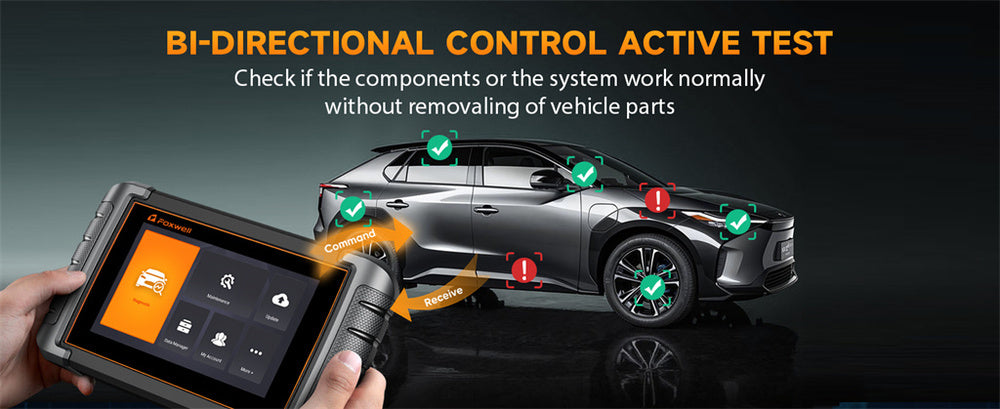
- In-depth Active Testing (Bi-directional Control): You can actively command the vehicle to perform actions to aid diagnosis, such as testing the throttle body, cycling the fuel pump/ABS pump, or triggering fan relays.
- 30+ Professional Reset & Adaptation Services: Covers the most common essential operations for Ford maintenance and repair, including: Transmission Adaptation Learning, Battery Registration (BMS Reset) and DPF Regeneration Initiation ,etc.
- Comprehensive Live Data Stream: View hundreds of real-time parameters like turbo boost pressure, fuel trim values, and individual cylinder misfire counts—fundamental for deep analysis.
- Ongoing Update Support: Comes with 3 years of free online updates, ensuring compatibility with the latest Ford models and trouble code databases.
Autel MaxiCOM Series: The Powerful & Reliable Alternative
The Autel MaxiCOM series (e.g., MK808) is a strong competitor in the same class as the Foxwell NT809, offering equally deep, system-wide diagnostics for Ford vehicles.
Key Capabilities & Features: (using the MK808 as an example):
- Full System Diagnostics & Active Test: Supports reading/clearing codes for all available systems and performing active tests.
- Coverage of Critical Special Functions: Includes core services vital for Ford owners, such as: Forced DPF Regeneration and Injector Adjustment, Service Interval Reset and TPMS Sensor Relearn, etc.
- Efficiency & Hardware: Features a quad-core processor, a 7-inch touchscreen, automatic VIN identification, a 5000mAh battery, and WiFi update support.
Other Practical Alternatives
Before investing in a professional tool, consider these lower-cost options for temporary needs or basic checks:
- Diagnostic Apps: Some smartphone applications connect directly with your car's diagnostic system via Bluetooth or Wi-Fi, turning your phone into a scanner.
- Borrow a Scanner: Many major auto parts stores (e.g., AutoZone, O'Reilly) offer free loaner OBD2 scanners. This is a zero-cost, convenient option for a one-time basic code read/clear.
How to Choose the Right Ford Diagnostic Tool for You?
- The Foxwell NT809 often has an edge in user-friendly interface and well-integrated guidance for Ford-specific functions, making it very intuitive for beginners.
- The Autel MaxiCOM MK808 may have slight advantages in raw functional depth for certain module programming tasks and hardware specs (like battery capacity).
- For a one-off check or basic code clearing, explore the free loaner program at local parts stores.

Conclusion
Reading Ford codes without a scanner is more than possible; it's rather enjoyable! Without needing an expensive toolkit to understand what your car's trying to tell you, these simple strategies allow you to act like an amateur car detective solving its mysteries of check engine lights - whether using the light flash method on older cars or the jumper wire method with newer ones! You've got this!
For more detailed steps and code definitions, consult your vehicle's service manual or trusted automotive websites. Have fun troubleshooting!
FAQs:
Can I read Ford codes without a scanner?
Yes, you can use the key turn method or an OBD1 jumper wire to read Ford codes without a scanner.
What is the key turn method for reading Ford codes?
The key turn method involves turning the ignition key on and off to display error codes on the dashboard.
Do I need any tools to read Ford codes without a scanner?
For some methods, like the OBD1 jumper wire technique, you might need basic tools like a wire or paperclip.


Leave a comment
This site is protected by hCaptcha and the hCaptcha Privacy Policy and Terms of Service apply.