

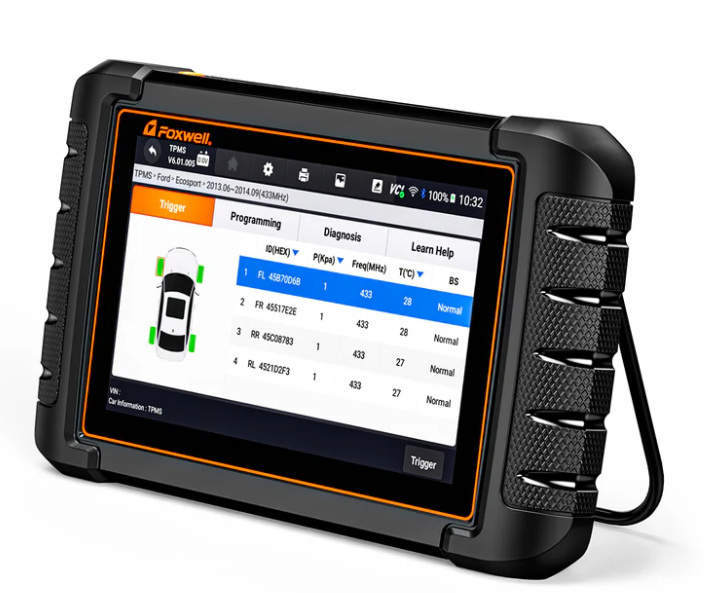
The Foxwell NT809TS is designed as a professional diagnostic scanner with Bi-directional Control, TPMS service capabilities, All-System Diagnosis, and 30+ maintenance functions. It is built to support DIY users, home mechanics, and professional technicians who need more than basic code reading.
This FAQ guide covers vehicle compatibility, diagnostic capabilities, advanced functions, limitations, updates, and real-world usage scenarios to help you understand what the NT809TS can do and whether it is the right diagnostic solution for your needs.
Vehicle Compatibility
Does the NT809TS support all vehicles?
No.
The available functions of a diagnostic tool depend on vehicle manufacturer data access, vehicle model, production year, and system configuration.
Generally, the NT809TS supports:
- Reading and clearing trouble codes
- Live Data monitoring
- All-System Scan
Some advanced functions, including:
- Bi-directional Control
- TPMS Sensor Programming
- Key Matching
- Service Reset Functions
may vary depending on vehicle compatibility.
Before purchasing, we recommend confirming your vehicle model and required functions to ensure support.
Does the NT809TS support motorcycles, Tesla, and all vehicle types?
The NT809TS is mainly designed for passenger vehicle diagnostics and supports a wide range of mainstream car brands.
Supported Vehicles
- Most common passenger vehicles
- Popular brands including Toyota, Ford, Nissan, Honda, Chevrolet, and more
Special Vehicle Limitations
- Motorcycles:
The NT809TS supports limited basic diagnostics for some motorcycles, such as reading vehicle information and fault data.
However, most advanced functions, including special service functions and Bi-directional Control, are not supported.
- Tesla Vehicles:
The NT809TS does not support Tesla-specific diagnostic functions.
- Some low-volume brands or special vehicles:
Function coverage may be limited depending on market version and vehicle system configuration.
Always confirm compatibility before purchase.
Can the NT809TS diagnose hybrid and new energy vehicles?
The NT809TS supports selected hybrid vehicles.
Depending on the vehicle model, it may access information such as:
- High-voltage battery data
- Battery status
- Related fault codes
Available functions vary by vehicle brand, model, and year.
We recommend checking compatibility before purchase( contact our support team: support@foxwelldiag.com).
Recommend reading: Foxwell NT809TS Diagnostic Scanner Tool Review
Core Diagnostic Functions
Why do many users consider the NT809TS a “professional repair shop-level” diagnostic tool?
The NT809TS combines multiple functions that traditionally require separate tools:
- All-System Diagnosis
- Bi-directional Control
- TPMS Service
- 30+ Maintenance Services
For many DIY users and independent technicians, it provides the diagnostic and maintenance functions needed for everyday repair tasks.
Can the NT809TS identify the cause of a problem, or does it only read trouble codes?
The NT809TS does more than read trouble codes.
It supports:
- Live Data
- Bi-directional Control
- Active Tests
- All-System Scan
These functions help users analyze vehicle conditions more effectively and reduce unnecessary part replacement.
However, final repair decisions should always be based on actual vehicle conditions.
Real-World Usage
Is the NT809TS suitable for users with no repair experience?
Yes.
Even users with little or no repair experience can use the NT809TS for common tasks, including:
- Reading and clearing trouble codes
- Performing maintenance resets
- Checking TPMS status
- Running basic vehicle health scans
Recommended starting steps:
- Use Auto VIN identification to recognize the vehicle
- Run Quick Scan to check vehicle modules
- Use guided service menus for maintenance functions
- Follow on-screen instructions for supported services
Advanced functions such as Bi-directional Control, Active Tests, and deeper diagnostics provide more capabilities and can be explored as users gain experience.
The NT809TS is ideal for:
- DIY enthusiasts
- Home mechanics
- Independent technicians
- Small repair shops
TPMS Service & Programming
How does the NT809TS perform in TPMS service? Does it support all vehicles?
TPMS service is one of the key features of this TPMS scan tool, but available functions vary by vehicle make, model, and year.
TPMS Features
- Program Foxwell TPMS Sensors (supports Foxwell T10, T20, etc.)
- TPMS Sensor Relearn
- TPMS Diagnosis
- TPMS Warning Light Reset
- Sensor registration after replacement (depending on vehicle support)
The NT809TS works well with many mainstream passenger vehicles, including Toyota, Honda, Ford, Chevrolet, Nissan, and other common platforms.
Compatibility Notes
- Not all vehicles support the same TPMS functions
- Some older vehicles may have limited TPMS support
- Some low-volume brands may have limited coverage
- TPMS programming is mainly designed for Foxwell TPMS Sensors; third-party sensor programming may not be supported
Dedicated TPMS tools may provide broader sensor brand coverage and more specialized TPMS workflows.
If TPMS programming, sensor replacement, and tire pressure system maintenance are your primary needs, explore our dedicated TPMS scanner solutions.
Pre-purchase Note
Please be sure to verify compatibility based on your vehicle's make, model, and year of manufacture. Even for the same model, vehicles from different production years may differ in their support for TPMS functions.
Advanced Features
Does the NT809TS support ECU flashing or performance tuning?
No.
The NT809TS is designed for vehicle diagnostics and maintenance, not ECU tuning.
Supported Functions
- Trouble code reading and clearing
- All-System Diagnosis
- Bi-directional Control
- Active Tests
- Maintenance reset services
- TPMS service functions
- Injector coding (for supported vehicles)
Not Supported
- ECU flashing
- ECU Remapping
- Stage 1 / Stage 2 / Stage 3 tuning
- Custom RPM limiter changes
- Torque management adjustment
- Advanced engine calibration
If your goal is performance tuning, dedicated ECU tuning hardware and software are required.
What is the core difference between the NT809TS and a professional ECU Tuning Tool?
Functions Supported by NT809TS
- Read & clear Diagnostic Trouble Codes (DTCs)
- Full multi-system vehicle scanning
- Bi-Directional Control & component active tests
- Oil, EPB and all routine maintenance resets
- TPMS sensor programming & relearn
- Injector coding for supported vehicles
- Real-time live vehicle data monitoring & analysis
Functions NOT Supported by NT809TS
- ECU flashing or firmware rewriting
- Full engine ECU remapping
- Stage 1 / Stage 2 / Stage 3 performance tuning
- Custom RPM limiter configuration
- Torque management modification
- Advanced engine performance calibration
- DOD/AFM variable displacement tuning and related performance programming
When You Need a Dedicated ECU Tuning Tool
- Boosting engine horsepower or torque output
- Rewriting core engine fuel/ignition mapping
- Custom fuel and ignition parameter optimization
- Installing aftermarket performance calibrations
- Specialized ECU reprogramming and power tuning
Summary
Updates & Long-Term Use
How does the NT809TS software update system work? What happens if I skip renewal after the free update window expires?
Benefits of Regular Software Updates
- Support for newly released vehicle models
- Expanded full-system diagnostic coverage
- Updated TPMS sensor database
- Improved overall software stability
- Enhanced OEM compatibility & bug fixes
Update Process
- Supports direct online updates via the device
- New updates can be downloaded directly
- Specific update steps may vary depending on the software version and update content
After the 3-Year Free Update Period Expires
- All pre-installed diagnostic functions
- Existing vehicle model coverage database
- Full TPMS service workflows
- All maintenance reset and calibration tools
You will no longer receive new software upgrades unless you purchase a paid renewal subscription.
Users Recommended to Renew Updates
- Repair shops frequently servicing brand-new late-model vehicles
- Professional technicians requiring the latest vehicle coverage and newly launched diagnostic features
Users Who May Skip Renewal
- Casual DIY car owners
- Home hobby mechanics
- Technicians mainly working on older vehicles fully covered by the existing database
Setup & Ownership
How do I change the time format on the NT809TS?
You can adjust date and time settings directly in the device system settings.
Steps:
- Open System Settings
- Select Date & Time
- Adjust the available time format options
Available settings may vary depending on software version.
What should I do if the NT809TS cannot turn on?
In most cases, basic checks can solve startup issues.
Try:
- Check whether the USB charger works properly
- Check the charging cable
- Ensure the battery is not fully depleted
- Charge the device for a while before restarting
If the issue continues, contact technical support ( support@foxwelldiag.com) for further assistance.

FOXWELL NT809TS: Professional Diagnostic Scanner with TPMS Service
- Diagnose multiple vehicle systems including Engine, ABS, SRS, Transmission, TPMS and more
- Perform active tests and component controls with Bi-Directional Control
- Support TPMS sensor activation, relearn, diagnosis and programming functions
- Ideal for DIY users, advanced home mechanics and independent technicians
Closing
This full NT809TS FAQ covers every top pre-purchase and post-purchase question raised by DIY car owners, independent mobile technicians and small repair shop operators.
If you still have unresolved questions about TPMS function coverage, vehicle model compatibility or long-term software ownership after reading this guide, reach out to our support team with your vehicle’s make, model and manufacturing year for a personalized compatibility check before ordering.


Leave a comment
This site is protected by hCaptcha and the hCaptcha Privacy Policy and Terms of Service apply.