

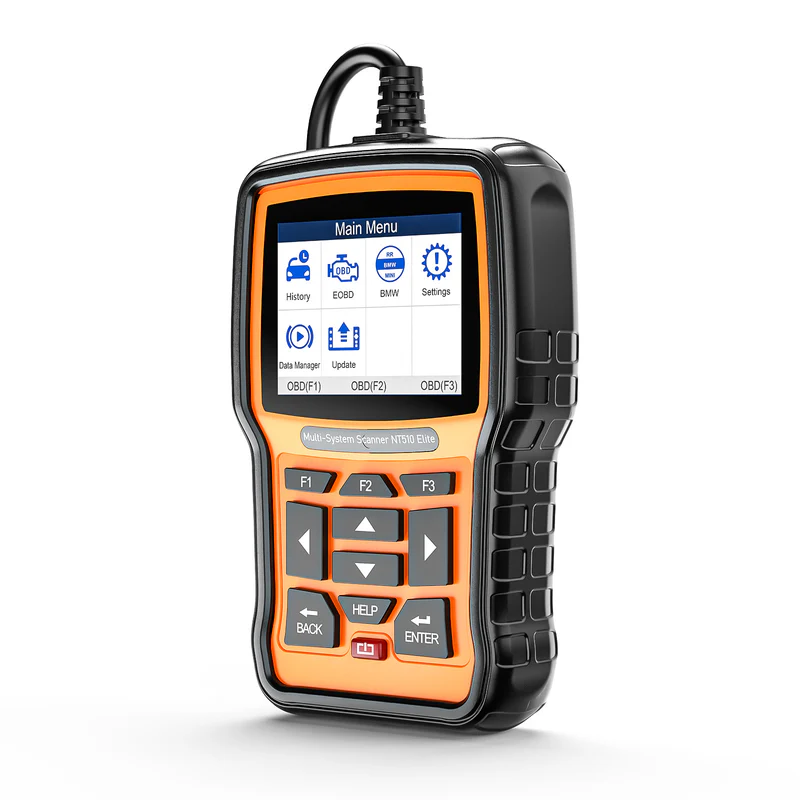
Still curious about Foxwell NT510 Elite? Here are the answers to all the questions you want to know.
Core Decision: Is It Right for Me?
Is the Foxwell NT510 Elite suitable for regular car owners, not professional mechanics?
It is ideal for DIY car owners and also friendly to entry-level professional technicians.
The NT510 Elite sits between a basic OBD2 code reader and a professional diagnostic platform.
What It Can Handle
- Basic diagnostics (Read/Clear Codes)
- Service reset functions
- Certain manufacturer-level functions
- Sensor matching and calibration
- System reset procedures
- Skill Level Required
No professional technician background is required, but some learning time is recommended for advanced functions.
If your goal is:
- Understanding why a warning light appeared
- Performing basic maintenance yourself
- Reducing unnecessary repair shop visits
then the NT510 Elite is a highly suitable option.
Compared to cheaper OBD2 tools, is upgrading to the NT510 Elite worth it?
If you frequently encounter warning lights and want to perform basic repairs yourself, upgrading is worthwhile.
Suitable for users who:
- Frequently encounter ABS/SRS/engine warning lights
- Want to reduce repair shop visits
- Want to perform basic troubleshooting independently
Not Ideal For:
- Only occasionally clear engine fault codes
- Have very basic diagnostic needs
I already have an OBD2 scanner. Why should I still consider the NT510 Elite?
The NT510 Elite is not limited to reading fault codes — it also supports certain system operations.
Regular OBD2 readers only focus on engine code reading and clearing. The NT510 Elite further grants access to ABS, SRS and more systems, plus bi-directional active test functions.
Practical scenarios you can use daily:
- System reset after part replacement
- Throttle and steering angle basic calibration
- Active component testing to assist fault locating
It allows you to finish more in-depth daily maintenance at home instead of only checking fault codes.
How does the NT510 Elite compare with Autel or Xtool devices?
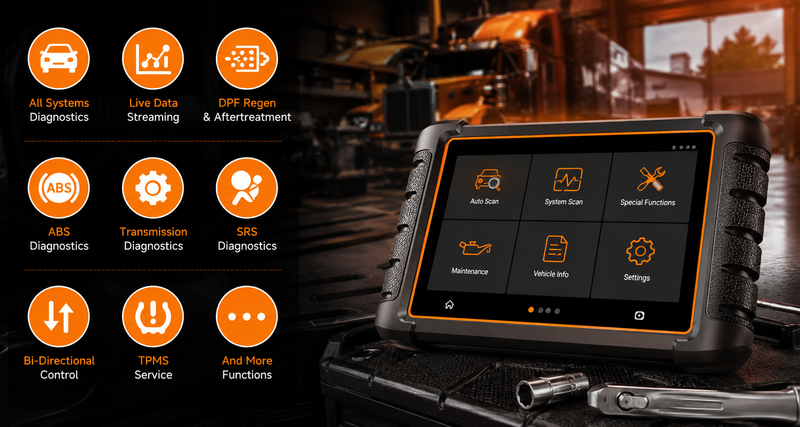
The NT510 Elite focuses on high cost performance and single-brand in-depth diagnosis, perfect for personal DIY long-term maintenance. High-end touchscreen scanners excel in full-brand compatibility, UI experience and commercial functions with higher pricing.
The NT510 Elite focuses on:
- High value-for-money
- Deep single-brand diagnostics
- DIY-focused ownership
Best for:
- Home users
- Long-term DIY maintenance
- Reducing repair shop diagnostic costs
Higher-end touchscreen platforms usually focus on:
- Full-brand coverage
- Commercial repair shop workflows
- Larger touch interfaces
- Higher pricing
- Simple Selection Logic
Choose NT510 Elite if you want:
- Better single-brand depth
- DIY maintenance capability
- Lower ownership cost
Choose high-end diagnostic tablets if you need:
- Commercial repair workflows
- High-frequency multi-brand repairs
- Advanced enterprise-level functions
Vehicle Compatibility
Can the Foxwell NT510 Elite be used on multiple vehicle brands?
Yes. The NT510 Elite supports multi-brand expansion.
Included Software
The device includes one full manufacturer software package by default
Examples:
- BMW
- Honda
- VAG
Additional Brand Expansion
Additional brands can be added separately.
-
Typical expansion pricing: $80 per brand
- Maximum supported brands: up to 5 brands
Best Fit Users
- Multi-vehicle households
- Small DIY garages
- Enthusiasts maintaining multiple brands
Important Limitation
- Additional manufacturer software must be purchased separately.
- Free full-brand unlocking is not supported.
More details: Foxwell software update
Is the Foxwell NT510 Elite universal? What if I own multiple cars of different brands?
No. The NT510 Elite supports multi-brand expansion, focusing on in-depth diagnosis for one default brand.
It comes with complete diagnostic software for one brand by default (BMW / Honda / VAG, etc.).
For the Included Brand, Users receive:
- Deeper system access
- More advanced functions
For other brands, The tool usually supports:
- Basic OBD functions
- Engine code reading/clearing
Advanced full-system diagnosis for other brands requires additional software license purchase.
Will I buy the wrong NT510 Elite version or encounter unsupported functions?
The device supports multiple brands, but functions depend on the installed software package.
Key Points
- The hardware supports multiple brands
- Each brand requires corresponding software
- Some advanced functions are only available for specific models
Recommendation Before purchase:
- Confirm your vehicle model
- Confirm desired functions
- Verify software compatibility
Can the NT510 Elite handle exclusive maintenance and calibration for niche models such as BMW, MINI and Honda JDM?
Yes. Deep compatibility with niche vehicles is one of its major DIY maintenance advantages.
The tool supports functions such as:
- VANOS adaptation
- Valvetronic functions
- Throttle matching
- ABS calibration
- TPMS adaptation
- JDM & Imported Vehicle Support
If Auto-VIN recognition fails: Manual vehicle selection can be used instead.
This is especially useful for:
- Parallel imports
- JDM vehicles
- Non-standard VIN vehicles
Note: A small number of rare or limited-production models may require compatibility confirmation in advance.
For compatibility assistance: Contact our team - support@foxwelldiag.com
If Auto-VIN recognition fails on the NT510 Elite, is it a device problem?
In most cases, this is considered normal behavior.
Auto-VIN recognition may be unstable on:
- Older vehicles
- Imported vehicles
- Certain JDM platforms
This is common in the automotive diagnostic industry.
Simple solution:
- Manually select brand → year → engine displacement to enter the diagnostic system.
This does not affect later diagnostics or functionality.
Core & Advanced Functions
What actual problems can NT510 Elite solve, such as ABS light, throttle and SRS airbag light?
It supports troubleshooting for most common electronic system faults, subject to vehicle model authorization.
Common available operations:
- Read and clear ABS / TC fault codes
- Throttle relearn adaptation
- Transmission and idle related reset
- SRS airbag module reading and reset for compatible models
Important Note
- Different brands and vehicle models support different functions.
- Some deep powertrain calibrations, such as crankshaft sensor relearn, may be restricted by manufacturer permissions.
- Checking compatibility before purchase is recommended.
Can the Foxwell NT510 Elite add new keys or modify vehicle system configuration?
No. The NT510 Elite does not support any new key addition or key matching function. It only supports basic system reset and calibration on partial models, subject to vehicle brand and system authority.
Supported functions on compatible models:
- SAS steering angle calibration
- service light reset
- EPB / SRS / ABS service reset
- basic module calibration adaptation
- Usage Experience & Practicality
Important Limitation:
- It does not support in-depth system configuration modification, nor is it compatible with all car models universally.
- Please check the official vehicle coverage list before purchase to set accurate function expectations.
Is the Foxwell NT510 Elite difficult to use?
Moderate; it is not plug-and-play.
Basic operations are straightforward:
- Read Codes
- Clear Codes
- Basic service resets
Advanced functions require:
- Exploring layered menus
- Understanding system categories
- Familiarity with diagnostic workflows
This is normal for professional-grade diagnostic tools.
Is the NT510 Elite operation complicated? Do I need a professional background?
Basic functions are easy to get started; advanced functions require simple menu familiarization.
Recommended Approach For first-time use:
- Refer to the user manual or tutorial videos
- Start with basic functions first
- Gradually explore advanced functions
This makes the learning process much easier.
What is the recommended operation process of the NT510 Elite for first use?
Recommended Beginner Workflow
- Connect the vehicle: Enter Auto Scan or manually select the vehicle
- Read fault codes: Record the codes and analyze the issue
- Repair the issue: Clear fault codes
- Perform relearn/reset functions if necessary
Recommended Learning Path
- Basic diagnostics first
- Advanced functions afterward
This provides a smoother learning experience.
What is the daily usage experience of the NT510 Elite like? (Buttons, screen visibility, build quality)
The device follows an entry-level professional design philosophy focused on practicality first.
Build Quality
- Durable anti-slip rubber housing
- Solid tactile buttons
- Designed for garage and roadside repair environments
Screen Experience
- Clear diagnostic data presentation
- Compact layout improves portability
- Easy to carry inside a vehicle
Live Data Display
The interface prioritizes:
- Accurate numeric data
- Practical diagnostics
- Simplified charts for maintenance reference
What are the common "normal phenomena" during use of the NT510 Elite?
The following are considered normal design trade-offs for professional diagnostic tools and do not affect core functionality.
- Buttons require moderate pressing force for durability design.
- Multi-layer menu structure is standard for professional diagnostic devices.
- Function differences across models are limited by OEM system authority; confirm with support by providing vehicle info and target function before purchase.
- Auto-VIN failure on old cars and JDM models is caused by protocol compatibility; manual model selection works normally with no impact on test accuracy.
These situations are common across similar professional diagnostic tools and do not affect normal operation.
Cost & Long-Term Use
Do updates and advanced functions of the NT510 Elite cost extra?
Basic updates are free; additional brand software may require separate purchase.
Core system firmware updates are permanently free.
New brand software license is available for optional paid purchase.
Are updates for the NT510 Elite difficult? Do I need extra equipment?
No. The device supports full WiFi online updating.
Users do not need:
- SD cards
- External computers
- Update Process
Simply:
- Connect to WiFi
- Check for updates
- Follow on-screen instructions
Regular updates are recommended for:
- Better vehicle coverage
- Feature optimization
- Stability improvements
After adding additional vehicle brands for the NT510 Elite, do future updates still require payment?
No. Firmware updates remain free for expanded brands.
Both the default built-in brand and later purchased additional brands get lifetime free updates, including new vehicle coverage, function optimization and bug fixes.
No extra payment is required for subsequent upgrades; you can update directly via the device online.
Can using the Foxwell NT510 Elite really save repair shop diagnostic fees?
Yes. It can effectively reduce maintenance costs under suitable scenarios.
With comprehensive system data reading and professional reset & test functions, it helps you avoid unnecessary inspection fees in daily scenarios:
- Service light reset
- Fault code reading and preliminary judgment
- Simple system and component status testing
It delivers obvious value for long-term vehicle owners with basic hands-on ability.
Limitations & Avoiding Pitfalls
What are the most common usage limitations of the NT510 Elite?
- Partial functions are not fully unlocked for all models.
- Menu hierarchy takes time to get used to.
- Advanced programming functions are not supported.
What is the most common pitfall for new users of the NT510 Elite?
- Mistake 1 — Assuming It Can Fix Every Problem
The tool is a:
Diagnostic tool
Reset tool
It is not a universal hardware repair solution.
- Mistake 2 — Underestimating the Learning Curve
Advanced functions require:
Basic menu familiarity
Understanding workflow logic
Reviewing tutorials beforehand is recommended.
- Mistake 3 — Ignoring Vehicle Compatibility Differences
Before purchase:
Confirm vehicle model
Confirm model year
Confirm desired function support
This avoids compatibility misunderstandings.
What are the most common usage limitations of the NT510 Elite?
- Some vehicle functions are partially restricted
- Menu structures require adaptation time
- Certain advanced programming functions are unsupported
How to confirm whether the NT510 Elite supports a specific function such as throttle relearn?
The most reliable way is to consult support with your vehicle make, year and exact function name in advance.
Operation path reference:
- Find corresponding functions under Maintenance / Service menu,
- Enter Engine / ABS system for special adaptation options.
Menu paths vary by car brand, which is normal.

Leave a comment
This site is protected by hCaptcha and the hCaptcha Privacy Policy and Terms of Service apply.