

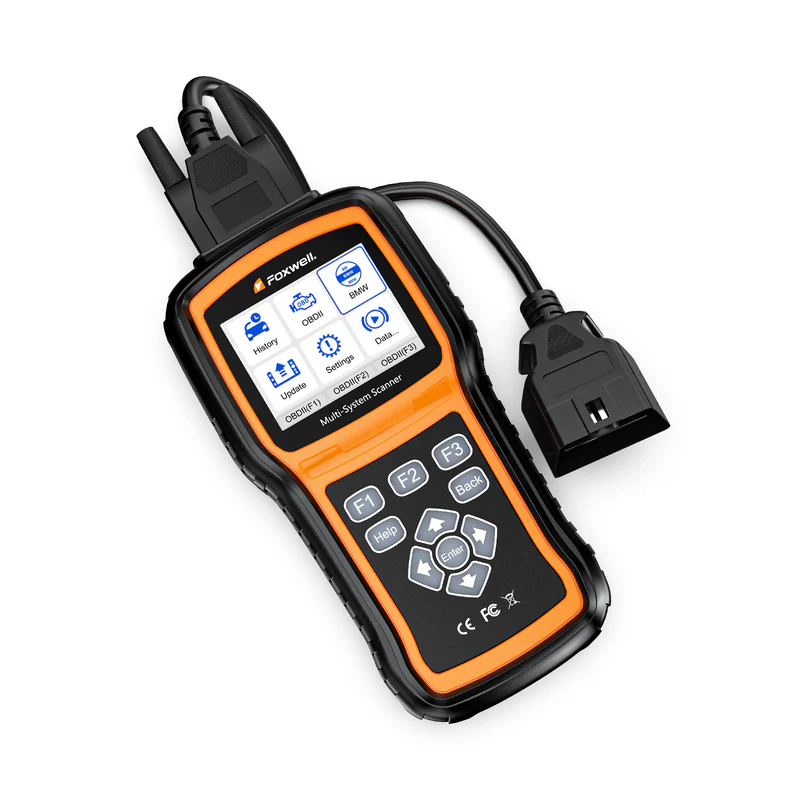
Still curious about Foxwell NT530 Plus? Here are the answers to all the questions you want to know.
Real-World Usage
Is the NT530 Plus worth it for the price?
Yes — if you need deep diagnostics without paying for OEM tools.
- Best value when:
You focus on 1–2 car brands
You need service functions + diagnostics
- Not worth it if:
You expect OEM-level capabilities
You need programming or coding-heavy work
Based on Real User Experience, is NT530 Plus Worth Buying?
Yes – If you want dealer-level diagnostics but don't want to pay dealer prices.
No – If you need programming or advanced coding.
- Reasons users like it:
- Easy setup
- Accurate diagnostics
- Value for money compared to dealer-provided tools - Not suitable for:
- Key programming or ECU flashing
- Advanced module coding or modifications
Can NT530 Plus Replace a Professional Shop Scanner?
No — it’s designed for advanced DIYers, not full workshop programming.
- Best for:
- Home users
- Small garages
- Maintenance & diagnostics
- Not ideal for:
- Module replacement workflows
- Advanced programming
- Dealer-level repair jobs
Is NT530 Plus Good For Emission / Smog Diagnostics?
Yes — this is one of its strongest use cases.
- What it helps with:
Reading emission-related codes
Monitoring live data
Identifying root causes
Real-world use: Many Foxwell users use it to track down why their car fails a smog test, instead of just guessing or replacing parts blindly.
Vehicle Compatibility
Will NT530 Plus work on my BMW / Porsche / Honda?
Usually yes — but you must verify your exact model.
- Reality:
✔ Wide brand coverage (BMW, Porsche, Honda, etc.)
⚠️ Functions vary by model, year, and ECU - What to check before buying:
👉 Your exact model + year
👉 Required functions (e.g. ABS bleeding, DPF)
Important:
👉 Some features may not appear at all if your vehicle doesn’t support them — even if the tool has that function
Why can’t I find or use certain functions of NT530 PLUS?
This is normal — not every function will show or work on every vehicle.
- Some functions depend on your vehicle’s ECU access level
- Certain features may not appear at all if your car doesn’t support them
- Some functions only work under specific conditions (e.g. ignition ON, engine OFF)
Real-world example:
- ABS bleeding may be available
- But ABS pump activation might not trigger on some BMW models
What this means for you:
- ✅ Core diagnostics (read/clear codes, live data) work reliably
- ⚠️ Advanced service functions vary by vehicle
- ❌ This tool does not override vehicle limitations
Before you buy:
- If you need full system diagnostics → OK
- If you expect every advanced function to work on every car → not realistic
Why does NT530 Plus require VIN?
It ensures accurate diagnostics for your exact vehicle.
- Why VIN matters:
- Same model/year vehicles can have different configurations
- Different ECUs and components require different access paths
- Benefits:
- More accurate system detection
- Correct function matching
Note: Using VIN helps avoid incorrect diagnostics or missing features.
Product Comparison
What’s the difference between NT530 Plus and NT630 Plus?
- Choose NT530 Plus if you need:
- Full vehicle scanning (engine, transmission, ABS, SRS, etc.)
- Brand-specific diagnostics (e.g., BMW, Porsche)
- Basic coding and adaptations
- Choose NT630 Plus if you need:
-ABS bleeding and brake system work
- SRS / airbag diagnostics
- Reliable bi-directional control (actuator tests)
- Key limitations:
- NT530 Plus: Not for advanced coding or programming
- NT630 Plus: Not a full-system diagnostic tool
- Functions depend on your vehicle compatibility
Bottom line:
👉 Want everything in one tool → NT530 Plus (full system OBD2 scanner for complete vehicle diagnostics)
👉 Focus on brakes & safety systems → NT630 Plus (ABS/SRS specialist)
What’s the difference between NT530 and NT530 Plus?
The NT530 Plus is the upgraded version of the older NT530, with a more convenient update process.
Key difference:
- NT530 Plus: Updates directly via Wi-Fi (no computer needed)
- NT530: Requires a Windows PC for software updates
What this means for you:
- Faster setup and easier updates with NT530 Plus
- No cables, no PC dependency
- Better long-term usability
Bottom line:
👉 NT530 Plus is the newer, more user-friendly version — and the recommended choice today.
Core Diagnostic Functions
Can the NT530 Plus Perform DPF Regeneration and Test Carbon Deposit Levels?
Yes — if your diesel vehicle supports DPF functions.
You can run DPF regeneration and monitor related data (like soot levels), but availability depends on your vehicle’s ECU.
Can NT530 Plus Read Live Data with Engine Running?
Yes — it supports real-time live data while the engine is running.
- What it can do:
View live sensor data in real time (engine, ABS, transmission, etc.)
Display data in text and graph formats
Record and playback data to help diagnose intermittent issues
- How it works:
Connects directly to the vehicle via cable (wired connection)
Provides stable and continuous data during diagnostics
- Important notes:
This is a wired tool — it does not support Bluetooth or mobile apps
Not designed for use while driving; best used during stationary diagnostics
-
Summary:
Ideal for accurate, stable diagnostics in the garage — not for app-based or on-the-go monitoring.
Advanced Features
Can NT530 do Advanced Module Synchronization (CAS, DME, EKPS)?
Limited — not recommended for advanced module synchronization or programming.
- What it can do:
- Basic module coding and adaptations
- Some BMW-related functions (depending on model support)
- What it does NOT reliably support:
- Full module synchronization (e.g. CAS–DME matching)
- Advanced programming tasks (e.g. EKPS coding)
- ECU flashing or complex module replacement workflows
- What this means for you:
- Suitable for diagnostics and basic service functions
- Not suitable for advanced programming or module replacement jobs
-
Note:
If your main goal is module programming or synchronization, this tool may not meet your needs. For advanced module programming or synchronization, OEM-level or specialized programming tools are typically required.
Can the NT530 Plus Program Key Fobs or Immobilizer Keys?
No, the NT530 Plus is not designed for key programming.
- What it can do:
Read and clear fault codes from multiple systems (Engine, ABS, SRS, etc.)
Perform maintenance and service functions
- What it cannot do:
Program new key fobs
Perform immobilizer (IMMO) programming
-
Note: If your main goal is key programming or anti-theft matching, this tool will not meet your needs.
Limitations & Restrictions
What NT530 Plus is NOT designed for?
The NT530 Plus is a professional diagnostic and service tool — but it is not intended for certain advanced or specialized tasks.
- It is NOT designed for:
Key programming or immobilizer (IMMO) matching
ECU flashing or online programming
Advanced coding or feature unlocking (e.g. enabling/disabling hidden features)
App-based or Bluetooth diagnostics
- What this means for you:
Ideal for diagnostics, maintenance, and basic coding
Not suitable for advanced programming, tuning, or mobile app use
Note:
If your main goal involves programming, key matching, or deep customization, you may need a more specialized or OEM-level tool.
Software & Ownership
Is the NT530 Plus Software Really Free?
Yes — you get 1 vehicle brand software for free, with lifetime updates.
- What you get:
✔ 1 brand of your choice (e.g., BMW, Honda, Porsche)
✔ Lifetime free updates — no subscription needed
✔ Full access to diagnostics and service functions for that brand
- How it works:
You simply select your main vehicle brand during setup
The software is then activated on your device
- Good to know:
You can add more brands anytime if needed
Most users only need one brand for daily diagnostics
Can the NT530 Plus Support Multiple Car Brands? Can I Add More Later?
Yes — but it doesn’t come fully unlocked for all brands by default.
- How it works:
✔ Includes 1 free vehicle brand software when you purchase
✔ You can add more brands anytime (up to 5 total)
✔ Additional brands require a separate purchase
- How adding a new brand works:
👉 Purchase the software for your desired brand
👉 Provide your scanner serial number
👉 The software is authorized remotely (no shipping needed)
👉 Update your device — the new brand will appear
- Important to know:
⚠️ Software is tied to your device (non-transferable)
⚠️ Authorized software cannot be refunded
⚠️ Some older serial numbers may not support adding software
Most users start with one brand and only expand if needed — so you don’t have to overpay upfront.
Want to see all supported brands or how the activation works step-by-step? You can check the Foxwell extra software details page for the full list and instructions.
What is the warranty policy for the NT530 Plus?
The NT530 Plus comes with a 1-year warranty from the date of purchase.
What’s covered:
- Manufacturing defects
- Hardware malfunctions under normal use
What’s not covered:
- Damage caused by misuse, accidents, or unauthorized repairs
- Normal wear and tear
In many cases, issues can be resolved through troubleshooting or software updates, and our support team (support@foxwelldiag.com) is always available to assist you..
Performance & Hardware
Is the NT530 Plus Slow During Full System Scans?
No — this is normal for a professional full-system diagnostic tool.
- Why it may take longer:
- Scans multiple ECUs (engine, ABS, SRS, transmission, etc.)
- Uses Smart VIN for accurate vehicle identification
- Reads deeper, more detailed data than basic OBD2 scanners
- Typical experience:
- Quick code reading: fast (about 1–2 minutes)
- Full system scan: several minutes (5–10 minutes is normal)
- What this means for you:
- More time = more complete and accurate diagnostics
- Not just reading codes, but checking the entire vehicle system
-
Note:
- If you prefer quick, app-based scanning, a Bluetooth tool may feel faster.
- If you need deeper diagnostics and maintenance functions, the NT530 Plus is the better choice.
Final takeaway
The NT530 Plus is best for users who want deep, brand-specific diagnostics and service functions without paying dealer prices.
If your goal is programming, coding, or module replacement, you’ll need a more advanced tool.


Leave a comment
This site is protected by hCaptcha and the hCaptcha Privacy Policy and Terms of Service apply.